

Manuals of product GT-E1207Y
Editorial note
The Samsung GT-E1207Y is an entry-level smartphone that stands out for the reliability of the Samsung brand, known for the quality and durability of its products. This model offers an enhanced user experience thanks to an intuitive interface, making it easy to use on a daily basis. Additionally, the provided documentation, including a user manual and safety instructions, allows for easy handling. In terms of performance, the GT-E1207Y meets essential needs such as making calls and sending messages. Its battery life is also satisfactory, allowing for prolonged use without frequent recharging. Its compact design makes it easily portable, although it may not be suitable for those who prefer larger screens. However, this model has limitations. As an entry-level smartphone, it lacks advanced features such as 4G or 5G connectivity, which may restrict its use in certain situations. Furthermore, the storage capacity is limited, and the camera quality may not satisfy users looking for high-quality photos. Overall, the Samsung GT-E1207Y offers good value for money for those seeking a simple and functional device, but it is important to keep in mind its restrictions in terms of features and performance.Score details
User experience
The user experience is enhanced by an intuitive and accessible interface, making daily use of the Samsung GT-E1207Y easier.
Performance
The performance is suited for daily needs, such as making calls and sending messages, although it is limited for more demanding tasks.
Battery life
The battery life is satisfactory for daily use, allowing for prolonged use without frequent recharging.
Design
The compact design of the Samsung GT-E1207Y makes it easy to carry, although it may not be suitable for those who prefer larger screens.
Value for money
As an entry-level smartphone, the value for money is generally good, but it lacks advanced features compared to more expensive models.
Documentation
The documentation is comprehensive with a user manual and safety instructions, making it easier to get accustomed to the device.
Features
The Samsung GT-E1207Y lacks certain advanced features, such as 4G or 5G connectivity, which may limit its use in certain situations.
Advantages
Reliability of the Samsung brand
Intuitive and accessible interface
User manual available
Performance suited to daily needs
Compact and easy-to-carry design
Disadvantages
Lack of advanced features
Screen too small for comfortable use
Limited storage for apps and files
No 4G or 5G connectivity
Poor quality camera
Technical Specifications GT-E1207Y
General Information
-
ModelGT-E1207Y
-
Brand
-
Category
-
Type
-
SKU1786201
-
MPN1786201
Frequently Asked Questions
How do I reset my Samsung GT-E1207Y?
What should I do if my SIM card is too small for my phone?
What is the role of the IMEI number?
What are the dimensions of my smartphone's screen?
Is it possible for my smartphone's battery to explode?
How can I turn on my Samsung GT-E1207Y?
How do I turn off my Samsung GT-E1207Y?
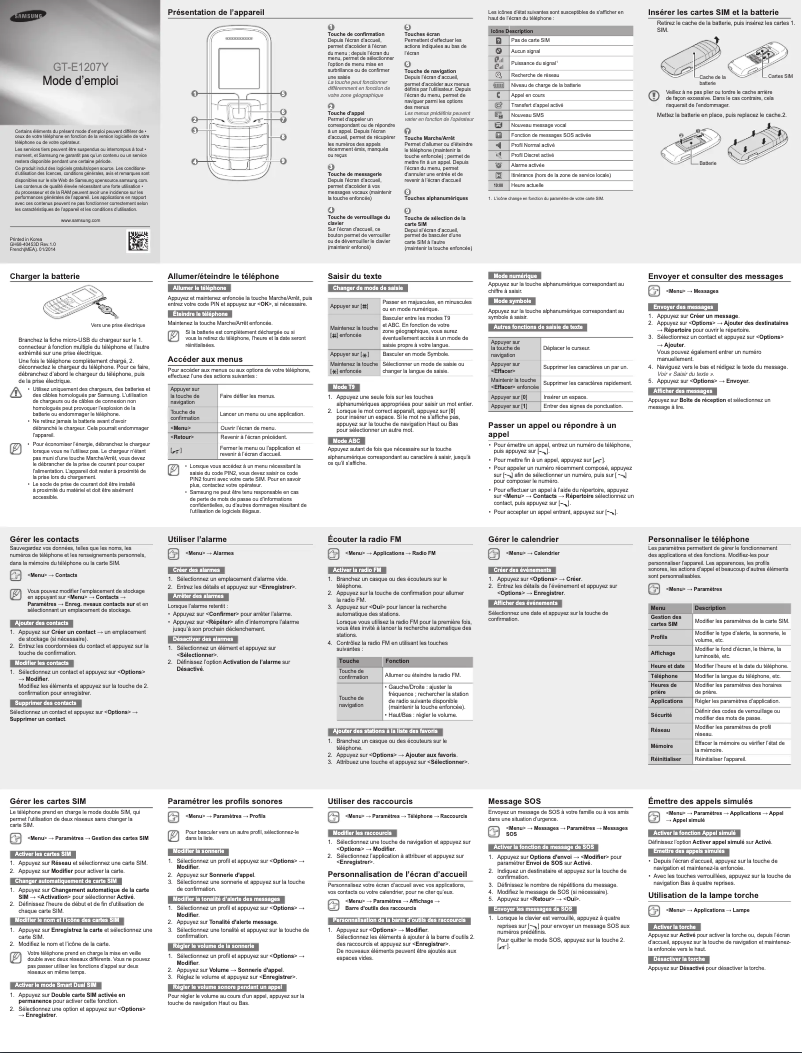
What is the procedure for inserting SIM cards and the battery into the Samsung GT-E1207Y?
What is the method for charging the battery of my Samsung GT-E1207Y smartphone?
How do I navigate through the menus and options on my Samsung GT-E1207Y smartphone?
Is the manual for the Samsung GT-E1207Y available in French?
Similar products


More product categories from brand Samsung
Television and multimedia Samsung
Home appliances Samsung
Household appliances Samsung
Phones Samsung
Audio Samsung
Other Samsung
Interior Samsung
Tools Samsung
Software Samsung
More product types from brand Samsung


Presentation of product GT-E1207Y specifications from brand Samsung
General Information
The Samsung GT-E1207Y is a smartphone from the renowned brand Samsung, known for its reliability and innovation in the mobile technology sector. This model, GT-E1207Y, is designed to provide a smooth and intuitive user experience, tailored to everyday needs.
With its compact design, the GT-E1207Y is easily portable, making it an ideal choice for users looking for a simple and functional device. It stands out for its durability, ensuring consistent performance over time.
Advantages
- Brand reliability: Samsung is a benchmark in quality, ensuring long-term use of its devices.
- Intuitive interface: The GT-E1207Y model offers simple navigation, making its daily use accessible to everyone.
- Comprehensive documentation: The presence of a detailed user manual allows new users to quickly familiarize themselves with the phone.
- Suitable performance: The technical specifications of the GT-E1207Y effectively meet basic communication needs, such as making calls and sending messages.
- Practical design: Its small size makes it easy to handle and transport, perfect for those who prioritize simplicity.
Disadvantages
- Entry-level smartphone: As an entry-level model, it may lack some advanced features available on newer and more expensive smartphones.
- Limited screen size: Its small screen may make navigation and using applications less comfortable for users accustomed to larger screens.
- Restricted storage capacity: The limited memory may pose issues for those wanting to install many applications or store multimedia files.
- Absence of 4G/5G connectivity: The lack of support for next-generation networks limits browsing speed, especially in areas where a fast connection is crucial.
- Camera quality: The camera performance may not satisfy users looking for high-quality photos.


