

Manuals of product LE26B450C4W
Editorial note
The Samsung LE26B450C4W television stands out for its recognized build quality and durability, which inspires confidence in users. With a compact 26-inch design, it is ideal for small spaces such as bedrooms or kitchens, offering an enhanced user experience thanks to satisfactory performance for everyday use. The accessible documentation, including a manual and a quick start guide, makes installation and handling of the device easier. However, this model has some drawbacks. Its screen size may be insufficient for large rooms, limiting the viewing experience. Additionally, the lack of Smart TV features restricts access to popular streaming apps, which may disappoint some users. The picture quality, while acceptable, does not always meet current standards, especially for high-definition content, and the design may seem a bit dated compared to newer models. Finally, connectivity options are limited, which could complicate connecting to multiple external devices. Overall, the Samsung LE26B450C4W is an acceptable choice for those looking for a compact and reliable television, but it may not be suitable for users seeking advanced features and optimal picture quality.Score details
User experience
The user experience is enhanced by optimal performance, ensuring smooth and enjoyable use.
Performance
Although the performance is satisfactory for everyday use, the image quality may not meet current standards for resolution, especially for high-definition content.
Design
The compact 26-inch design is ideal for small spaces, but it may seem a bit dated compared to newer models with modern finishes.
Value for money
The value for money is acceptable, especially for a reputable brand like Samsung, but the lack of Smart TV features could limit its appeal.
Documentation
The accessible documentation, including a user manual and a quick start guide, makes installation and getting started with the device easier.
Features
The features are limited, particularly the absence of Smart TV, which restricts access to popular streaming applications.
Robustness
The build quality is recognized, providing confidence in the durability and longevity of the television.
Advantages
Durable manufacturing quality
Smooth and pleasant use
Accessible installation documentation
Versatile for various uses
Compact design for small spaces
Disadvantages
26-inch screen too small.
No Smart TV features.
Outdated image quality for HD.
A bit dated design.
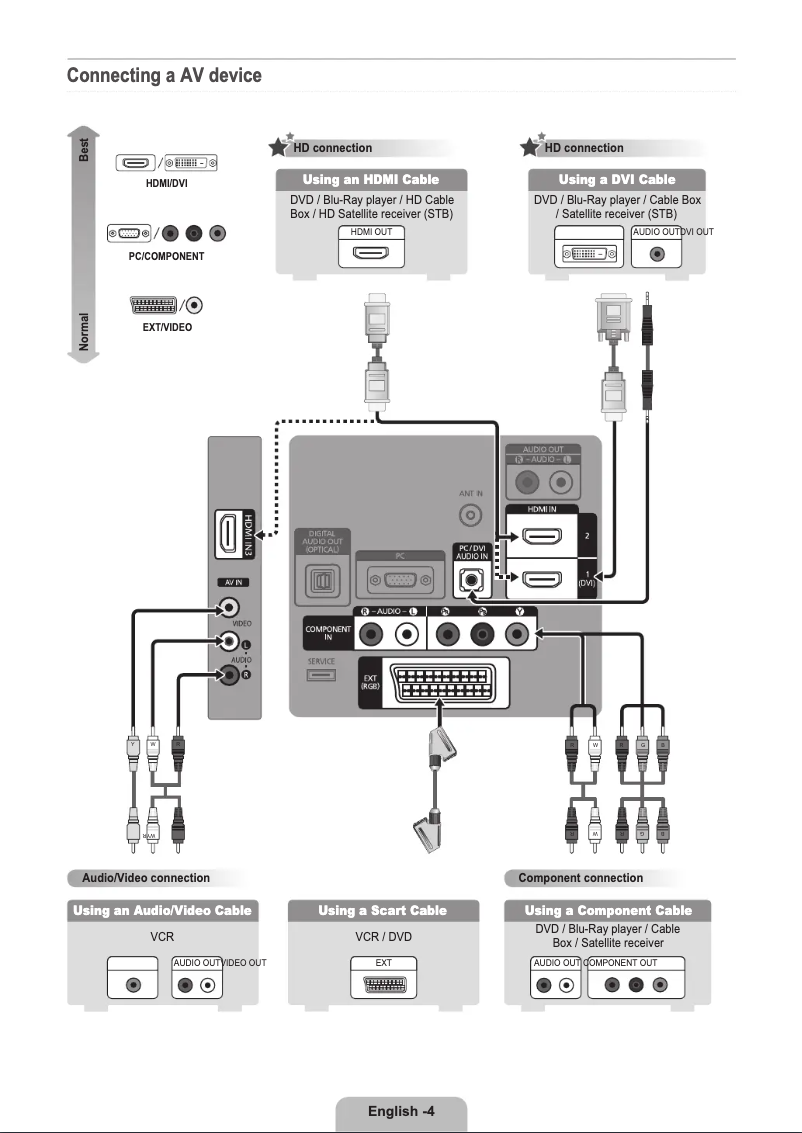
Limited connectivity for external devices.
Technical Specifications LE26B450C4W
General Information
-
ModelLE26B450C4W
-
Brand
-
Category
-
Type
-
SKU1351739
-
MPN1351739
Frequently Asked Questions
What is the recommended viewing distance for my Samsung TV?
What should I do if my TV is not receiving a signal?
What are the dimensions of my TV screen?
What does the acronym HDMI stand for?
Is it possible to connect devices from different brands via Bluetooth?
Why is my Samsung LE26B450C4W TV not displaying an image?
How can I adjust the volume on my Samsung LE26B450C4W TV?
Why is the sound on my Samsung LE26B450C4W TV distorted or unclear?
How do I set up my Samsung LE26B450C4W TV to access the Internet?
Why is my remote control not working with my Samsung LE26B450C4W TV?
Is the manual for the Samsung LE26B450C4W available in French?
Similar products


More product categories from brand Samsung
Television and multimedia Samsung
Home appliances Samsung
Household appliances Samsung
Phones Samsung
Audio Samsung
Other Samsung
Interior Samsung
Tools Samsung
Software Samsung
More product types from brand Samsung


Presentation of product LE26B450C4W specifications from brand Samsung
General Information
The Samsung LE26B450C4W television embodies the excellence of the Samsung brand, widely recognized for its innovation and the quality of its home appliances. This model, designated by the references LE26B450C4W and LE-26B450C4WXXN, is designed to deliver optimal performance, ensuring a pleasant and smooth viewing experience.
Advantages
This television has many strengths:
- Build Quality: Samsung is known for its durable devices, which ensures trust and longevity.
- User Experience: The LE26B450C4W model is designed for optimal performance, offering an intuitive and enjoyable use.
- Accessible Documentation: The user manual and quick start guide available make it easy to install and get acquainted with the device.
- Versatility of Use: Suitable for various uses, this television is ideal for watching movies, shows, or playing games, thus meeting the diverse needs of users.
- Compact Design: With a 26-inch screen, it fits perfectly in small spaces such as bedrooms or kitchens, while providing satisfactory image quality.
Disadvantages
However, the Samsung LE26B450C4W also has some limitations:
- Screen Size: The 26 inches may be insufficient for large rooms, thus limiting the visual experience for those who prefer larger televisions.
- Lack of Smart TV Features: This may restrict access to popular streaming apps, making the television less versatile compared to other contemporary models.
- Image Quality: Although satisfactory, the image quality may not meet current standards, especially regarding high-definition content.
- Design: The style of the television may seem a bit outdated compared to the modern finishes offered by other recent models.
- Connectivity Options: The available ports may be limited, making it difficult to connect to multiple external devices.


