

Manual of product QA55QN95CAK
Editorial note
The Samsung QA55QN95CAK television stands out for its exceptional picture quality thanks to its QLED technology, offering vibrant colors and deep contrasts. Its modern and elegant design integrates harmoniously into various interiors, making this device an aesthetic as well as functional choice. The advanced connectivity features facilitate access to streaming applications, and its immersive audio experience, thanks to high-quality speakers, enhances enjoyment when watching movies and series. Additionally, the optimized gaming mode will appeal to video game enthusiasts, ensuring responsiveness and smoothness. However, the high price of this model may pose a barrier for many consumers, especially in the face of alternatives offering similar features at a lower cost. While the picture quality is impressive, some users may find that the default settings require adjustments to achieve an optimal viewing experience. Furthermore, connectivity is limited with a restricted number of HDMI and USB ports, which can be problematic for those wishing to connect multiple devices at the same time. The built-in software, while efficient, may seem less intuitive for some users, leading to a learning curve. Finally, the weight and dimensions of the device can complicate its installation, requiring a sturdy wall mount or suitable TV stand. Overall, the Samsung QA55QN95CAK offers a satisfactory user experience, but a few drawbacks should be considered before making a choice.Score details
User experience
The user experience is generally satisfactory, although the integrated software may require an adjustment period for some users.
Performance
The image performance is excellent thanks to QLED technology, offering vibrant colors and deep contrasts, but adjustments may be necessary for optimal optimization.
Design
The design is modern and sleek, fitting perfectly into any type of interior.
Features
The advanced connectivity features are appreciated, but the limitation on the number of HDMI and USB ports can be a drawback for some users.
Value for money
The high price can be a barrier for many consumers, especially compared to other similar models on the market.
Usability
The learning curve of the integrated software can make usage less intuitive for some users.
Robustness
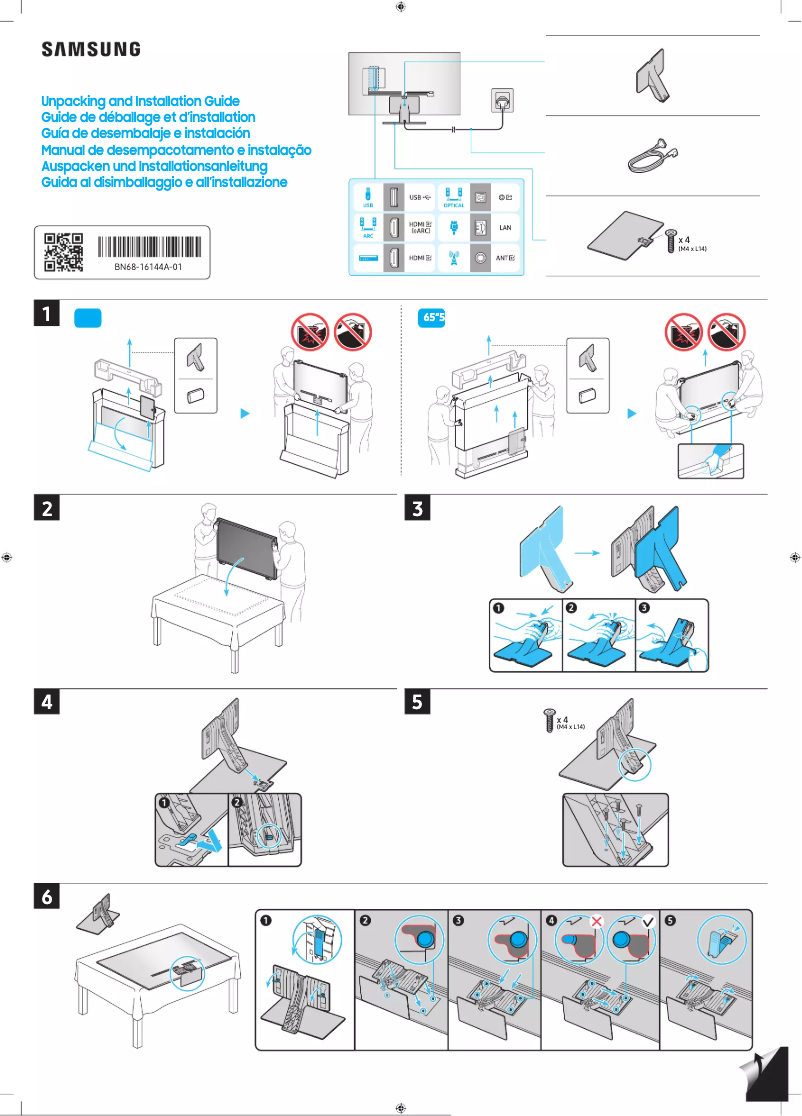
The weight and dimensions of the device can complicate its installation, requiring a sturdy wall mount or suitable furniture.
Advantages
QLED image quality, vibrant colors.
Modern design that fits all interiors.
Advanced connectivity for streaming applications.
Immersive audio with quality speakers.
Optimized gaming mode for increased responsiveness.
Disadvantages
High price for many consumers
Image settings requiring adjustments
Limited connectivity with few ports
Software less intuitive than other models
Weight making installation difficult
Technical Specifications QA55QN95CAK
General Information
-
ModelQA55QN95CAK
-
Brand
-
Category
-
Type
-
SKU1847387
-
MPN1847387
Frequently Asked Questions
What is the recommended viewing distance for my Samsung TV?
What should I do if my television is no longer receiving a signal?
What are the dimensions of my television screen?
What does the acronym HDMI stand for?
Is it possible to establish a Bluetooth connection between devices from different brands?
Is the manual for the Samsung QA55QN95CAK available in French?
Similar products


More product categories from brand Samsung
Television and multimedia Samsung
Home appliances Samsung
Household appliances Samsung
Phones Samsung
Audio Samsung
Other Samsung
Interior Samsung
Tools Samsung
Software Samsung
More product types from brand Samsung


Presentation of product QA55QN95CAK specifications from brand Samsung
General Information
The Samsung QA55QN95CAK is a television from the prestigious brand Samsung, known for its commitment to innovation and quality in the electronics sector. This model is designed to deliver top-notch performance, ensuring an enriching visual experience for users.
Advantages
This television stands out for its exceptional picture quality thanks to advanced QLED technology, which allows for vibrant colors and striking contrasts. Its modern and elegant design seamlessly integrates into any interior, adding an aesthetic touch to your space.
The advanced connectivity features make it easy to access a multitude of streaming applications, making your movie nights even more enjoyable. Additionally, the immersive audio experience is enhanced by high-quality speakers, ideal for enjoying movies and series with rich sound.
Video game enthusiasts will also appreciate the optimized game mode, which ensures superior responsiveness and image fluidity, allowing for full enjoyment of the action.
Disadvantages
However, the high price of the Samsung QA55QN95CAK may be a barrier for some consumers, especially compared to other similar models on the market. Despite its impressive picture quality, some users might feel that the default settings require adjustments to achieve an ideal visual experience.
Regarding connectivity, the limited number of HDMI and USB ports may pose a problem for those wishing to connect multiple devices simultaneously. Furthermore, while the integrated software is efficient, it may seem less intuitive compared to other television operating systems, leading to a learning curve for some users.
Finally, the dimensions and weight of the device may complicate its installation and movement, requiring a sturdy wall mount or suitable TV stand to ensure its stability.


