

Manuals of product QA65QN85DBU
Editorial note
The Samsung QA65QN85DBU stands out for its exceptional picture quality thanks to QLED technology, which offers vibrant colors and high contrast. The performance is impressive, ensuring an immersive viewing experience. Additionally, its sleek and modern design easily fits into any interior, adding a pleasing aesthetic touch. The user experience is generally satisfactory due to a user-friendly interface and advanced smart features, making access to various content easy. The support provided, with a user manual and installation guide, is comprehensive and helps with a smooth setup. However, some advanced features may require a learning curve, which can be a barrier for users less comfortable with technology. Nevertheless, the price of this model is relatively high compared to other similar televisions, which may pose accessibility issues for some budgets. Furthermore, the weight and size of the device can make installation and relocation difficult, especially in tight spaces. Finally, although the built-in audio system is optimized for an enhanced viewing experience, it may not satisfy audiophiles, who might consider purchasing a soundbar or an external audio system. In summary, the Samsung QA65QN85DBU is an excellent choice for those seeking high-quality visual performance and a modern design, but it is important to consider the cost and specific connectivity and audio needs before making a decision.Score details
User experience
The user experience is very satisfactory thanks to a user-friendly interface and advanced smart features that facilitate access to various content.
Performance
The performance is excellent with exceptional image quality thanks to QLED technology, offering vibrant colors and high contrast.
Design
The design is sleek and modern, easily fitting into any type of interior, adding an aesthetic touch to the space.
Value for money
The price is high compared to other similar models, which may not be accessible to all budgets, although the performance partially justifies this cost.
Usability
Although the interface is intuitive, some advanced features may require a learning curve, which can be confusing for less tech-savvy users.
Support
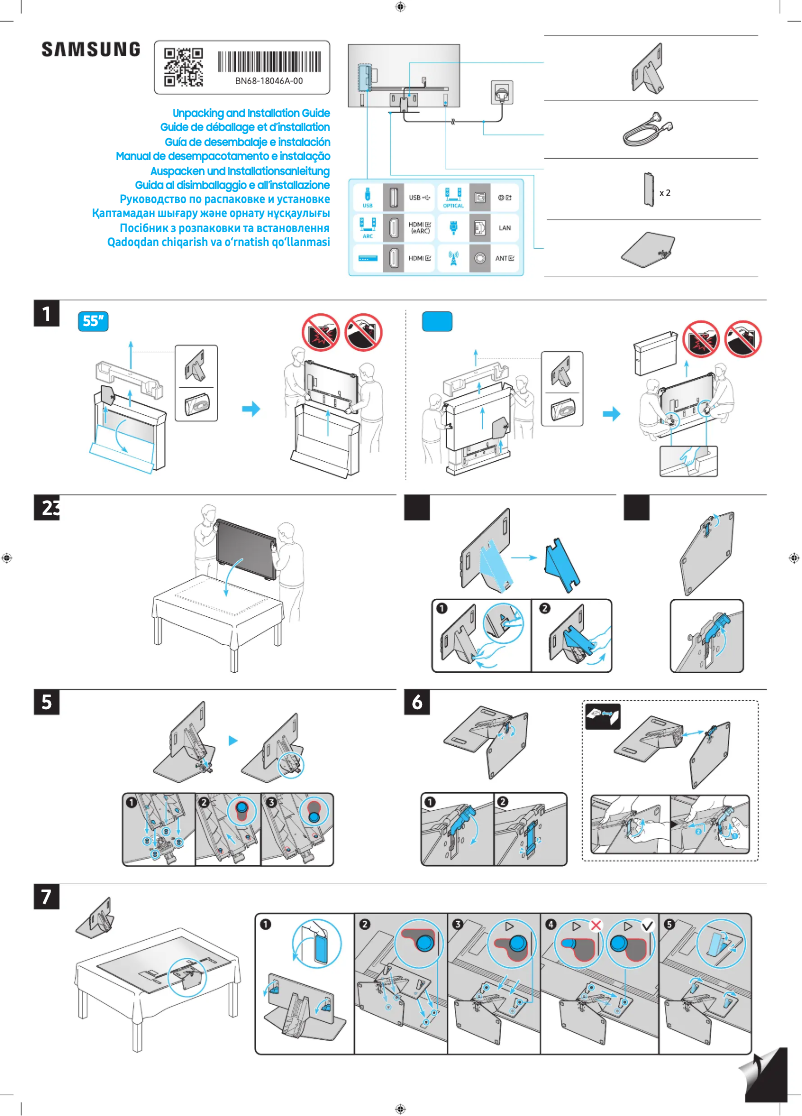
The available support and documentation, including a user manual and installation guide, are comprehensive and facilitate setup.
Robustness
The weight and size of the device can make installation and movement difficult, especially in tight spaces.
Advantages
QLED quality with vibrant colors
Modern and sleek design
User-friendly smart features
Immersive and optimized sound
Comprehensive documentation and support
Disadvantages
High price for some budgets
Difficult installation in tight spaces
Advanced features confusing for beginners
Insufficient built-in sound for audiophiles
Limited connectivity for older devices
Technical Specifications QA65QN85DBU
General Information
-
ModelQA65QN85DBU
-
Brand
-
Category
-
Type
-
SKU1933927
-
MPN1933927
Frequently Asked Questions
What is the recommended viewing distance for my Samsung TV?
What should I do if my television is no longer receiving a signal?
What are the dimensions of my TV screen?
What does the acronym HDMI stand for?
Is it possible to connect devices from different brands via Bluetooth?
Is the manual for the Samsung QA65QN85DBU available in French?
Similar products


More product categories from brand Samsung
Television and multimedia Samsung
Home appliances Samsung
Household appliances Samsung
Phones Samsung
Audio Samsung
Other Samsung
Interior Samsung
Tools Samsung
Software Samsung
More product types from brand Samsung


Presentation of product QA65QN85DBU specifications from brand Samsung
General Information
The Samsung QA65QN85DBU television is a high-end model from the renowned brand Samsung, known for its commitment to innovation and quality in the electronics sector. This 65-inch television offers an immersive viewing experience thanks to its QLED technology, which ensures vibrant colors and remarkable contrast, making every image more lifelike.
In addition to its exceptional visual performance, the QA65QN85DBU stands out with its modern and sleek design, allowing for seamless integration into various interior styles. It is also equipped with advanced smart features, making it easy to access a multitude of content and applications through an intuitive interface.
The sound of the device is designed to enhance your audiovisual experience, although audiophiles might consider adding a soundbar, as the built-in audio system may not meet all expectations. Additionally, comprehensive resources, including a user manual and installation guide, are provided to simplify setup and optimize the use of the television.
Advantages
- Exceptional picture quality: QLED technology offers vivid colors and high contrast.
- Sleek design: A modern style that fits all interiors.
- Smart features: Easy access to various content and applications through a user-friendly interface.
- Immersive sound: Optimized audio technologies to enhance the viewing experience.
- Comprehensive documentation: User manual and installation guide included for easy setup.
Disadvantages
- High price: May be inaccessible for some budgets compared to other similar models.
- Weight and size: Installation and moving can be difficult in tight spaces.
- Learning curve: Some advanced features may be confusing for less tech-savvy users.
- Integrated audio quality: May not be sufficient for audiophiles, requiring an external audio system.
- Connectivity options: Limitations for some older technologies that may pose issues for users with older devices.


