

Manuals of product QA75QN900DU

Editorial note
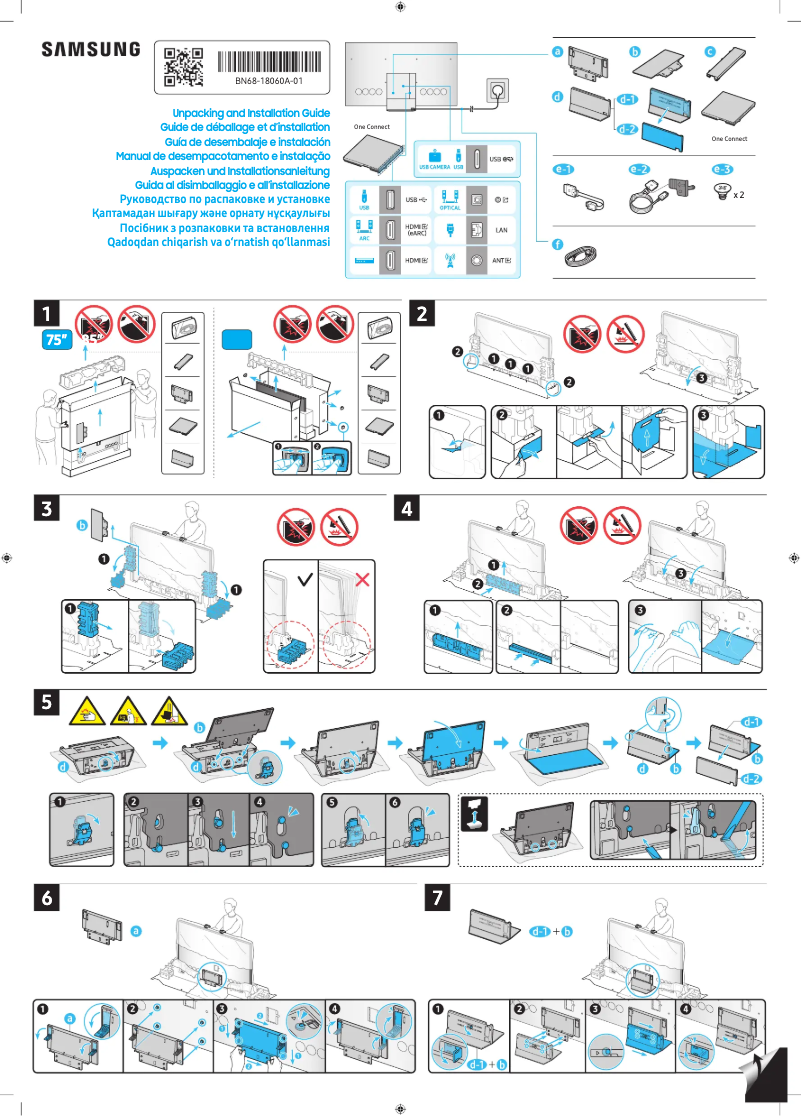
The Samsung QA75QN900DU television stands out for its exceptional picture quality thanks to QLED technology, offering vibrant colors and striking contrasts that promise an immersive viewing experience. Its sleek and modern design adds a touch of sophistication to any interior. Additionally, it offers smart features, allowing easy access to streaming apps and connectivity with other devices, making its use versatile and enjoyable. The high-quality audio system complements this experience, providing clear and powerful sound, ideal for enjoying movies, series, and games. However, this model has some drawbacks. Its high price may be a barrier for many consumers, making the product less accessible for certain budgets. Although the picture quality is impressive, adjustments to settings may be necessary to optimize the experience based on the content being viewed, which can be confusing for some users. Furthermore, its imposing size of 75 inches may not fit all living spaces, and its weight can make installation difficult, potentially requiring the help of several people. Finally, while the smart features are robust, navigating them can be complex for those who are not familiar with technology. In summary, the Samsung QA75QN900DU is an excellent choice for those seeking high picture quality and premium design, but its price and size may be obstacles for some buyers. Reliable technical support and comprehensive documentation, including a user manual and installation guide, nonetheless facilitate the setup.Score details
User experience
The user experience is generally positive, with an intuitive interface and smart features, although some people may find navigation complicated.
Performance
Performance is exceptional thanks to QLED technology, offering impressive picture quality. However, adjusting the settings may be necessary to optimize the experience.
Design
The design is sleek and modern, adding a touch of sophistication to any interior. However, its large 75-inch size may not suit all spaces.
Value for money
The high price of the Samsung QA75QN900DU may be a barrier for many consumers, making the product less accessible for some budgets.
Support
Technical support is reliable, with comprehensive documentation including a user manual and installation guide, making setup easier.
Usability
Although the features are robust, their use can be confusing for those who are not familiar with technology, which can affect the overall experience.
Advantages
Exceptional QLED picture quality
Modern and elegant design
Smart features and connectivity
Clear and powerful sound
Reliable technical support and documentation
Disadvantages
High price, inaccessible for some budgets
Necessary adjustments for optimal quality
Size of 75 inches, not well suited for small spaces
Heavy and difficult to install alone
Smart features, complex navigation
Technical Specifications QA75QN900DU
General Information
-
ModelQA75QN900DU
-
Brand
-
Category
-
Type
-
SKU1933900
-
MPN1933900
Frequently Asked Questions
What is the recommended viewing distance for my Samsung TV?
What should I do if my television is no longer receiving a signal?
What are the dimensions of my television screen?
What does the acronym HDMI stand for?
Is it possible to connect devices from different brands via Bluetooth?
Is the manual for the Samsung QA75QN900DU available in French?
Similar products


More product categories from brand Samsung
Television and multimedia Samsung
Home appliances Samsung
Household appliances Samsung
Phones Samsung
Audio Samsung
Other Samsung
Interior Samsung
Tools Samsung
Software Samsung
More product types from brand Samsung


Presentation of product QA75QN900DU specifications from brand Samsung
General Information
The Samsung QA75QN900DU television stands out due to the expertise of the Samsung brand, widely recognized for its commitment to innovation and quality in the home appliance sector. This model, with its advanced technical features, promises remarkable performance and an enhanced user experience.
Picture Quality
Equipped with QLED technology, the Samsung QA75QN900DU offers exceptional picture quality. This translates into vibrant colors and striking contrasts, allowing for total immersion when watching movies, series, or playing video games.
Design and Integration
Its refined and modern design makes it easy to integrate into any type of interior. This television adds a touch of sophistication to your living space, easily adapting to various decor styles.
Smart Features
The QA75QN900DU model is equipped with smart features that allow for seamless access to streaming applications and simplified connectivity with other devices. This enriches daily use and diversifies entertainment options.
Audio and Technical Support
With a high-quality audio system, this television delivers clear and powerful sound, ideal for all types of content. Additionally, reliable technical support and comprehensive documentation, including a user manual and installation guide, facilitate the product's setup.
Advantages
- Immersive picture quality thanks to QLED technology.
- Elegant design that harmoniously integrates into your interior.
- Smart features for easy access to digital content.
- High-performance audio system for an enriched sound experience.
- Technical support and comprehensive documentation for simplified installation.
Disadvantages
- High price that may be off-putting for some consumers.
- Adjustment of picture settings necessary for an optimal experience.
- Imposing size of 75 inches, which may pose installation issues in small spaces.
- Considerable weight, making installation more complex without assistance.
- Smart features sometimes deemed complicated to navigate for users unfamiliar with technology.


