

Manuals of product QE65Q73DAT
Editorial note
The Samsung QE65Q73DAT is a television that stands out for its exceptional picture quality thanks to QLED technology, offering vibrant colors and deep contrasts for an immersive viewing experience. Its sleek and modern design fits perfectly into any interior, adding a touch of sophistication to your living room. Moreover, it is compatible with the latest connectivity technologies, allowing for easy integration with various devices and streaming services. However, the price of this model can be high compared to other similar televisions, which may not suit all budgets. Its 65-inch size may also be too bulky for smaller spaces. Although the picture quality is generally excellent, some users have reported issues with viewing angles, leading to color degradation. Additionally, the operating system may seem less intuitive for some, making navigation through the menus less smooth. The built-in speakers lack power and clarity, which may require the addition of an external audio system for a better sound experience. Overall, the Samsung QE65Q73DAT is an excellent choice for those seeking superior picture quality and a polished design, but it is important to consider its drawbacks before making an investment.Score details
User experience
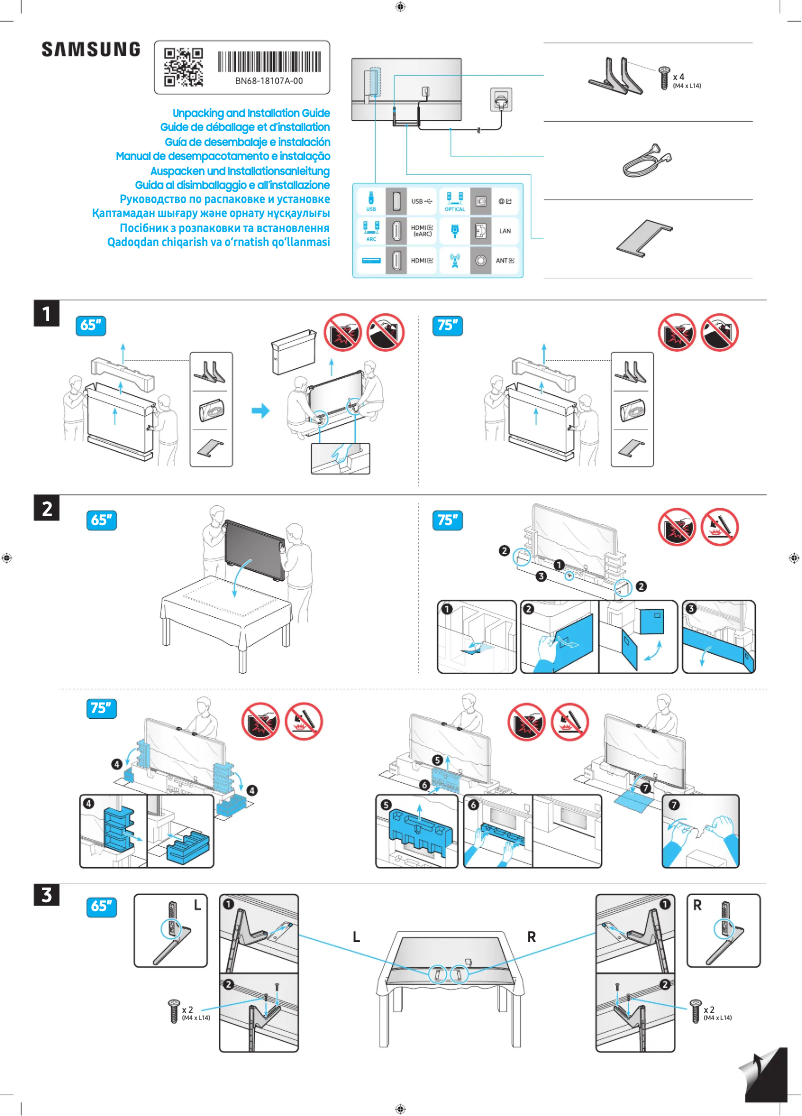
The user experience is generally positive, thanks to a detailed user manual and installation guide. However, some users may find the operating system less intuitive.
Performance
The performance is excellent, with exceptional image quality thanks to QLED technology, but the viewing angles can be problematic.
Design
The design is sleek and modern, fitting perfectly into various interiors, adding a touch of sophistication.
Value for money
The price is high compared to other similar models, which may not suit all budgets. However, the quality and durability of the brand partly justify this investment.
Usability
Ease of use is a major asset, although some users may encounter difficulties navigating the menus.
Features
Compatibility with the latest connectivity technologies is a great advantage, facilitating integration with various devices and streaming services.
audio
The built-in speakers lack power and clarity, which may require the addition of an external audio system for a better sound experience.
Advantages
QLED image quality, vibrant colors.
Modern connectivity, easy integration.
Sleek design, fits any interior.
Quick installation thanks to the user guide.
Reliability of the Samsung brand.
Disadvantages
High price compared to competitors
Bulky size for small spaces
Limited viewing angles degrading colors
Unintuitive operating system
Speakers lacking power and clarity
Technical Specifications QE65Q73DAT
General Information
-
ModelQE65Q73DAT
-
Brand
-
Category
-
Type
-
SKU1936685
-
MPN1936685
Frequently Asked Questions
What is the recommended viewing distance for my Samsung TV?
What should I do if my TV is no longer receiving a signal?
What are the dimensions of my TV screen?
What does the acronym HDMI stand for?
Is it possible to connect devices from different brands via Bluetooth?
Is the manual for the Samsung QE65Q73DAT available in French?
Similar products


More product categories from brand Samsung
Television and multimedia Samsung
Home appliances Samsung
Household appliances Samsung
Phones Samsung
Audio Samsung
Other Samsung
Interior Samsung
Tools Samsung
Software Samsung
More product types from brand Samsung


Presentation of product QE65Q73DAT specifications from brand Samsung
General Information
The Samsung QE65Q73DAT television embodies the excellence of the Samsung brand, known for its innovation and quality in the electronics sector. This 65-inch model is designed to provide an impressive visual experience thanks to its QLED technology, which results in vibrant colors and deep contrasts, immersing users in total immersion.
In addition to its display performance, the Samsung QE65Q73DAT stands out for its modern and elegant design, which seamlessly integrates into any type of interior, adding a touch of sophistication to your living room. This television is also compatible with the latest connectivity technologies, making it easy to integrate with various devices and streaming services.
Setting up the television is simplified thanks to a detailed manual and installation guide, ensuring a quick and hassle-free installation. As a product of the Samsung brand, it represents a long-term investment, supported by the trust that consumers place in this company.
Advantages
- Exceptional image quality thanks to QLED technology, offering vibrant colors and striking contrasts.
- Compatibility with the latest connectivity technologies for easy integration with various devices and streaming services.
- Elegant design that fits all interiors, bringing a modern dimension to your living space.
- Ease of use thanks to a detailed user manual, making installation and setup simple.
- Trusted brand, Samsung is recognized for its durability and innovation, ensuring a reliable product in the long term.
Disadvantages
- The price of the Samsung QE65Q73DAT may be high compared to other similar models, which may not suit all budgets.
- The 65-inch size may be cumbersome for some spaces, limiting its installation in smaller rooms.
- Although the image quality is generally excellent, some users may notice color degradation at specific viewing angles.
- The operating system may seem less intuitive, making navigation through menus and applications sometimes less smooth.
- The built-in speakers may lack power, prompting consideration of adding an external audio system for a better sound experience.


