

Manuals of product QN75Q65DAG

Editorial note
The Samsung QN75Q65DAG television stands out for its exceptional picture quality, offering vibrant colors and striking contrasts, contributing to an immersive viewing experience. Its sleek and modern design allows it to blend harmoniously into any type of interior, adding a touch of sophistication to your space. The user experience is also enhanced by intuitive features and simplified access to streaming and multimedia applications. Moreover, the reliability of the Samsung brand is an asset, ensuring durability and innovation in the field of household appliances. However, the price of the Samsung QN75Q65DAG can be a drawback, as it is high compared to other models of similar sizes, which may not suit all budgets. Some users may also encounter a learning curve with the Tizen operating system, especially if they are used to other interfaces. Although the picture quality is generally excellent, a few users have noted a lack of depth in blacks under low light conditions. Finally, the limited connectivity in terms of HDMI ports may pose a problem for those wishing to connect multiple external devices. Despite these drawbacks, the provided documents, such as the user manual and installation guide, make it easier to set up the television. Overall, the Samsung QN75Q65DAG is a solid choice for television enthusiasts looking for quality and design.Score details
User experience
The user experience is enhanced by intuitive features and easy access to streaming and multimedia applications.
Performance
The picture quality is exceptional, with vibrant colors and striking contrasts, although some users may perceive a lack of depth in the blacks in low-light conditions.
Design
The design is sleek and modern, fitting perfectly into any type of interior.
Value for money
The price may be high compared to other models of similar sizes, which may not suit all budgets.
Usability
Although the user manual and installation guide are included, some users may find that the Tizen operating system has a learning curve.
Robustness
The reliability of the Samsung brand is recognized, with durability in the field of household appliances.
Support
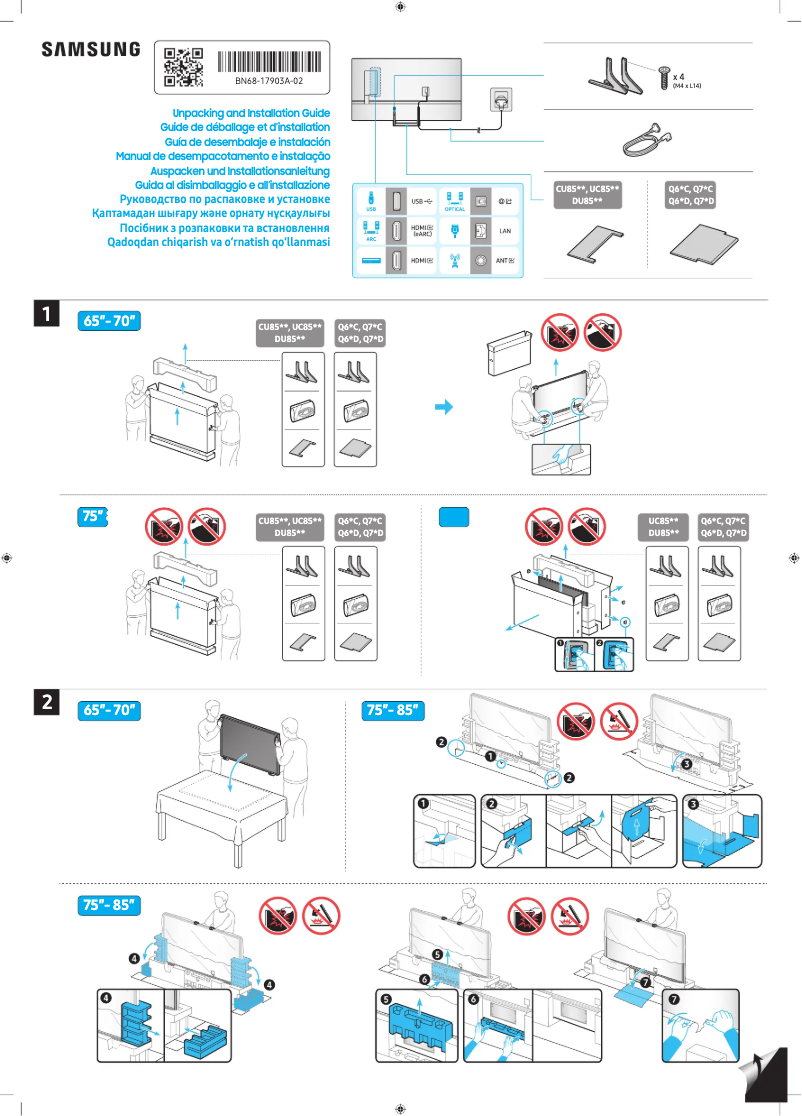
Two documents available, including a user manual and an installation guide, facilitate the setup and use of the television.
Features
Limited connectivity in terms of HDMI ports could be a drawback for those using multiple external devices.
Advantages
Exceptional image quality with vibrant colors
Intuitive interface for easy access to apps
Modern design that fits all interiors
Recognized reliability of the Samsung brand
Manual and installation guide included
Disadvantages
High price compared to other models
Learning curve for Tizen
Lack of black depth
Heavy weight, difficult installation
Limited HDMI ports for multiple devices
Technical Specifications QN75Q65DAG
General Information
-
ModelQN75Q65DAG
-
Brand
-
Category
-
Type
-
SKU1992215
-
MPN1992215
Frequently Asked Questions
What is the recommended viewing distance for my Samsung TV?
What should I do if my television is no longer receiving a signal?
What are the dimensions of my television screen?
What does the acronym HDMI stand for?
Is it possible to connect devices from different brands via Bluetooth?
Is the manual for the Samsung QN75Q65DAG available in French?
Similar products


More product categories from brand Samsung
Television and multimedia Samsung
Home appliances Samsung
Household appliances Samsung
Phones Samsung
Audio Samsung
Other Samsung
Interior Samsung
Tools Samsung
Software Samsung
More product types from brand Samsung


Presentation of product QN75Q65DAG specifications from brand Samsung
General Information
The Samsung QN75Q65DAG television is a product of the renowned brand Samsung, known for its excellence and innovation in the electronics sector. This model stands out for its ability to deliver superior performance, ensuring an enriching and enjoyable user experience.
Equipped with advanced display technology, the Samsung QN75Q65DAG offers remarkable picture quality, with vibrant colors and impressive contrasts. Its sleek and contemporary design allows it to blend harmoniously into various interior decors, adding a modern touch to your living space.
This television is also designed to facilitate access to streaming applications and multimedia content, thanks to an intuitive interface that enhances the browsing experience.
Advantages
- Exceptional picture quality: Enjoy vivid colors and striking contrasts thanks to Samsung's advanced technology.
- Enhanced user experience: Intuitive features and quick access to entertainment applications.
- Modern design: Fits perfectly into any type of interior.
- Brand reliability: Samsung is recognized for its innovation and the durability of its products.
- Ease of installation: User manual and installation guide included for simplified setup.
Disadvantages
- High price: The cost of the Samsung QN75Q65DAG may be higher than that of other models of similar sizes, which may not suit all budgets.
- Learning curve: Some users may find the Tizen operating system a bit complex if they are used to other interfaces.
- Black depth: Despite generally excellent picture quality, some users might feel a lack of depth in the blacks, especially in low-light conditions.
- Weight: The television can be heavy, making installation more difficult and possibly requiring additional help.
- Limited connectivity: The limited number of HDMI ports may pose a problem for those using multiple external devices.


