

Manual of product QN75Q80CAG
Editorial note
The Samsung QN75Q80CAG is a television that stands out for its exceptional picture quality, thanks to QLED technology that offers vibrant colors and striking contrasts. Its modern and sleek design makes it an aesthetic addition to any interior, while its 75-inch size ensures total immersion, ideal for movie lovers and video game enthusiasts. However, this model has some drawbacks. Its high price compared to other similar televisions may deter some consumers, although the quality partly justifies this investment. Additionally, its large size may not be suitable for all spaces, making its integration difficult in some homes. It is also important to note that some people may find the colors lack natural warmth compared to other display technologies. The user experience is overall enhanced by an intuitive interface and easy access to a wide range of streaming applications, although the Smart TV features may seem complex for less tech-savvy users. Finally, the device's heavy weight can complicate its installation, often requiring assistance for mounting or moving. In summary, the Samsung QN75Q80CAG is an excellent choice for those seeking superior picture quality and a sleek design, but it is essential to consider its dimensions and price before making a purchase.Score details
User experience
The user experience is enhanced by an intuitive interface and easy access to a wide range of streaming applications, although some less tech-savvy users may find the Smart TV features complex to navigate.
Performance
The picture quality is exceptional thanks to QLED technology, offering vibrant colors and striking contrasts, although some people may find that the colors lack natural warmth compared to other display technologies.
Design
The modern and sleek design of the Samsung QN75Q80CAG fits perfectly into any type of interior decor, adding an aesthetic touch to the space.
Value for money
The price is high compared to other similar models, which may deter some consumers, although the quality partly justifies this investment.
Usability
The imposing size of 75 inches offers total immersion for movie lovers and gamers, but may not be suitable for all spaces, making its integration into some homes difficult.
Robustness
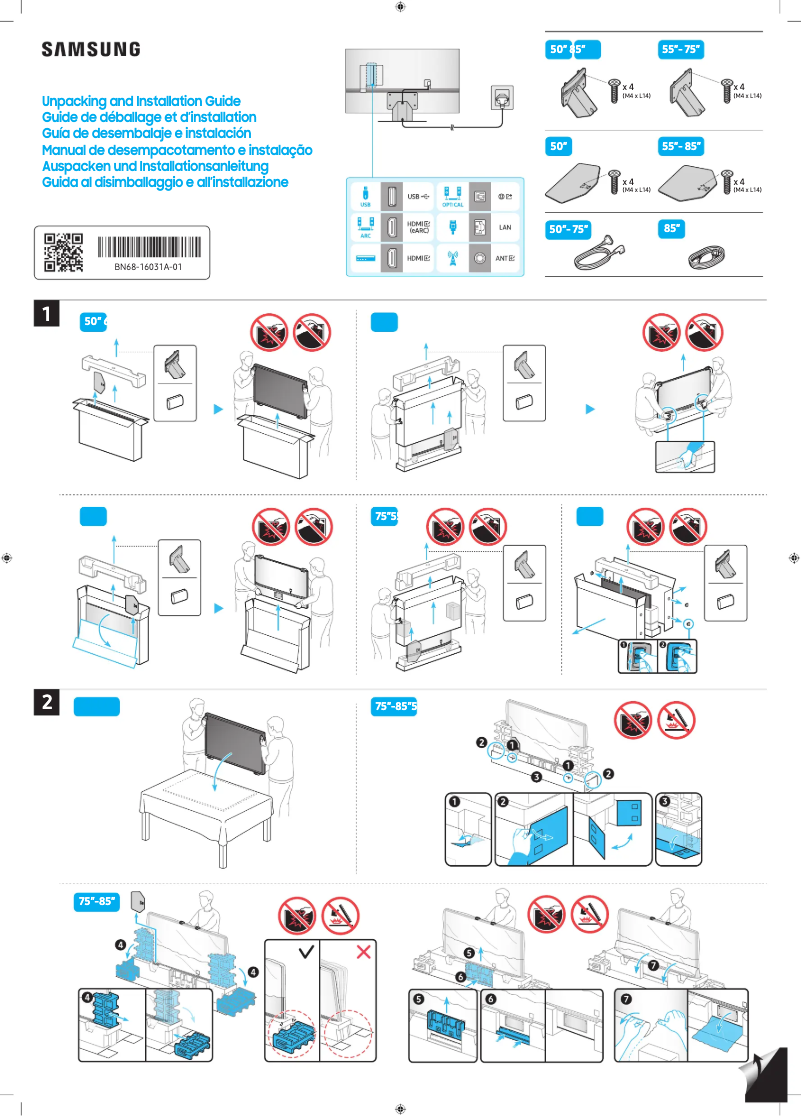
The heavy weight of the device can complicate its installation, often requiring additional assistance for mounting or moving.
Advantages
QLED image quality, vibrant colors.
Intuitive interface, easy access to apps.
75-inch screen for total immersion.
Modern design fits all decors.
Motion blur reduction for fast scenes.
Disadvantages
High price compared to other models
75-inch size not suitable for some spaces
Colors lacking natural warmth
Complex Smart TV interface for some users
Heavy weight making installation difficult
Technical Specifications QN75Q80CAG
General Information
-
ModelQN75Q80CAG
-
Brand
-
Category
-
Type
-
SKU1763116
-
MPN1763116
Frequently Asked Questions
What is the recommended viewing distance for my Samsung TV?
What should I do if my television is no longer receiving a signal?
What are the dimensions of my TV screen?
What does the acronym HDMI stand for?
Is it possible to connect devices from different brands via Bluetooth?
Is the manual for the Samsung QN75Q80CAG available in French?
Similar products


More product categories from brand Samsung
Television and multimedia Samsung
Home appliances Samsung
Household appliances Samsung
Phones Samsung
Audio Samsung
Other Samsung
Interior Samsung
Tools Samsung
Software Samsung
More product types from brand Samsung


Presentation of product QN75Q80CAG specifications from brand Samsung
General Information
The Samsung QN75Q80CAG is a television from the prestigious brand Samsung, renowned for its innovation and quality in the consumer electronics sector. This model, with its 75-inch screen, is designed to provide an immersive visual experience, ideal for movie and video game enthusiasts.
Equipped with QLED technology, this television stands out for its ability to produce vibrant colors and deep contrasts. Thanks to its intuitive user interface, it allows easy access to a wide range of streaming applications, thereby enhancing the home entertainment experience.
In terms of design, the Samsung QN75Q80CAG features a modern and sleek aesthetic, seamlessly integrating into any type of interior. Additionally, its advanced motion blur reduction technology is particularly beneficial for fast-paced action scenes or sporting events, ensuring exceptional image fluidity.
Advantages
- Remarkable image quality: Thanks to QLED technology, offering vivid colors and striking contrasts.
- User-friendly interface: Allows quick access to a wide selection of streaming applications.
- Impressive size: At 75 inches, ideal for total immersion in movies and games.
- Contemporary design: Perfectly integrates with various interior decor styles.
- Motion blur reduction: Great for dynamic content, ensuring image clarity.
Disadvantages
- High cost: Its price may make it less accessible compared to other similar models on the market.
- Imposing size: May not fit all spaces, making installation difficult in some homes.
- Color warmth: Although the image quality is excellent, some users may find the colors less natural than on other display technologies.
- Complexity of Smart TV features: May require an adjustment period for less tech-savvy users.
- Significant weight: Its weight can complicate installation and require additional assistance.


