

Manuals of product QN90A
Editorial note
The Samsung QN90A stands out for its exceptional picture quality, thanks to Neo QLED technology and 4K Ultra HD resolution that deliver vibrant colors and rich contrasts. Advanced audio features, such as Dolby Digital Plus and Q-Symphony, ensure an immersive and high-quality sound experience. Additionally, its modern and sleek design, combined with VESA-compatible mounting, makes it easy to integrate into various living spaces. Energy consumption is also optimized in standby mode and during normal use, contributing to savings on energy bills. However, there are some drawbacks to note. The energy efficiency class of the Samsung QN90A is G, which may lead to higher energy costs compared to more energy-efficient models. Furthermore, this model lacks Smart TV features, limiting access to streaming apps and the Internet. The native refresh rate of 50 Hz may not be suitable for gaming enthusiasts, thus reducing the fluidity of fast scenes. The lack of support for AMD FreeSync may also be a disadvantage for gamers. In summary, while the Samsung QN90A offers impressive picture and sound quality, its limitations in smart features and gaming performance may affect its value for money.Score details
User experience
The user experience is pleasant thanks to the exceptional image quality and advanced audio features, but the lack of Smart TV limits access to streaming applications.
Performance
The performance is good for most content; however, the native refresh rate of 50 Hz may not be suitable for gaming enthusiasts, reducing the fluidity of fast scenes.
Battery life
Energy consumption is optimized in standby mode and during normal use, contributing to savings on energy bills, even though the energy efficiency class is G.
Design
The design is modern and sleek, with a compatible VESA mount that facilitates integration into various living spaces.
Value for money
Although the Samsung QN90A offers impressive image quality, its higher energy cost and lack of Smart TV features may make its value for money less advantageous.
Features
Advanced audio features like Dolby Digital Plus and Q-Symphony enhance the sound experience, but the lack of support for AMD FreeSync may be a drawback for gamers.
Advantages
Exceptional Neo QLED 4K picture quality
Immersive sound with Dolby Digital Plus
Connectivity with multiple HDMI/USB ports
Modern design and VESA-compatible mounting
Optimized energy consumption in standby
Disadvantages
Energy class G, high costs.
No Smart TV features.
Refresh rate of 50 Hz.
No AMD FreeSync support.
Limited HDR, restricted visual experience.
Technical Specifications QN90A
General Information
-
ModelQN90A
-
Brand
-
Category
-
Type
-
SKU1427780
-
MPN1427780
Power
-
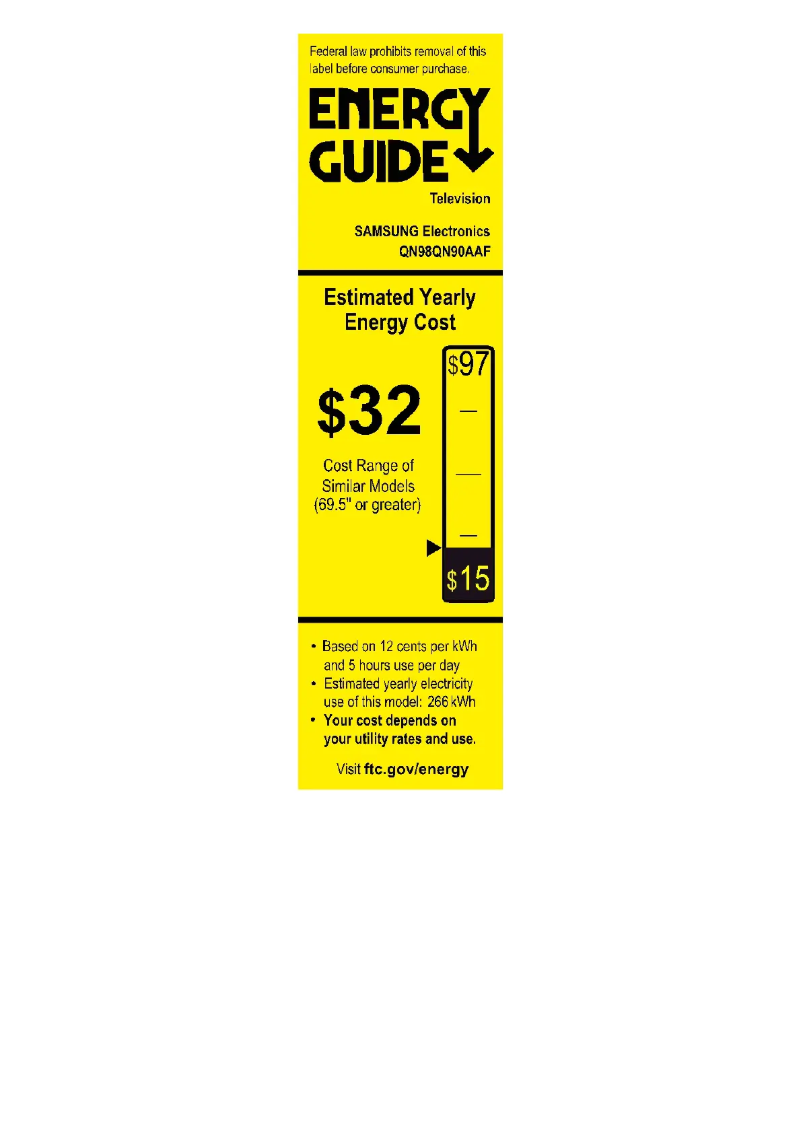
Energy efficiency class (HDR)G
-
Energy efficiency class (HDR)G
-
Energy consumption (SDR) for 1000 hours60 kWh
-
Energy consumption (HDR) for 1000 hours118 kWh
-
Energy consumption (standby mode)2 W
-
Typical electricity consumption118 W
-
AC input voltage220-240 V
-
AC input frequency50 - 60 Hz
-
Energy efficiency rangeA to G
Screen
-
Contrast ratio-
-
Screen size43 "
-
Type HD
-
Screen resolution4K Ultra HD
-
Image format
-
Screen diagonal (cm)3840 x 2160 pixels
-
Display technology
-
Native refresh rate16:9
-
Marketing name of the dynamic contrast ratio
-
Supported video modes108 cm
-
Response time
-
Screen brightnessNeo QLED
-
Interpolation movement technology
-
Screen refresh rate supported50 Hz
-
Anti-glare screen
-
Quantum Matrix Technology
-
-
2160p
-
-
- ms
-
-
- cd/m²
-
-
PQI (Picture Quality Index) 3900
-
-
60 Hz, 120 Hz
-
-
Yes
Representation / realization
-
Noise reduction-
-
HDR technology (high dynamic range)High Dynamic Range 10+ (HDR10 Plus)
-
AMD FreeSyncHybrid Log-Gamma (HLG)
-
Image processing technologyQuantum HDR 1500
-
AMD FreeSyncYes
-
AMD FreeSyncSamsung Contrast Enhancer
-
AMD FreeSyncYes
-
AMD FreeSyncYes
-
AMD FreeSyncYes
-
AMD FreeSyncYes
-
Ambient modeYes
-
AMD FreeSyncYes
-
AMD FreeSyncAmbient Mode+
-
AMD FreeSyncYes
-
AMD FreeSyncYes
-
AMD FreeSyncYes
-
AMD FreeSyncYes
-
AMD FreeSyncYes
-
AMD FreeSyncYes
-
Game functionsYes
-
AMD FreeSyncYes
-
Supported video formatDynamic Black EQ, Game Bar, Game Motion Plus, Super Ultra Wide Game View
-
Supported audio formatsYes
-
AMD FreeSync3GP, ASF, AVI, FLV, H.263, H.264 BP, M-JPEG, M2TS, MKV, MOV, MP4, MPEG, MPEG1, MPEG2, MPEG4-SP, MPG, MTS, MVC, PS, RMVB, RV30, RV40, SVAF, SVI, TP, TRP, TS, VC-1, VOB, VP6, VP8, VP9, VRO, WEBM, WMV7, WMV8
-
AMD FreeSync3GP, AAC, AIFF, ALAC, APE, FLAC, M4A, MIDI, MP3, MPA, OGG, Vorbis, WAV, WMA
-
Yes
-
Yes
Audio
-
Integrated audio decodersDolby Digital Plus
-
Active Voice Amplifier (AVA)Yes
-
Active Voice Amplifier (AVA)Yes
-
Active Voice Amplifier (AVA)Yes
-
Rated power of RMS20 W
-
Number of speakers2
-
Active Voice Amplifier (AVA)Yes
-
Active Voice Amplifier (AVA)Yes
Smart TV / smart TV
-
Internet TV-
-
Installed operating system-
-
Remote voice interactionYes
-
Video appsSamsung TV Plus
-
Remote voice interactionYes
-
Remote voice interactionYes
-
Remote voice interactionYes
-
Smart ModesFilmmaker, Movie, Natural
-
Remote voice interactionYes
-
Remote voice interactionYes
-
HbbTV (Hybrid Broadcast Broadband TV) version2.0.2
-
Remote voice interactionYes
Management features
-
Picture-in-Picture (PIP)Yes
-
Picture-in-Picture (PIP)Yes
-
Picture-in-Picture (PIP)Yes
-
Picture-in-Picture (PIP)Yes
-
Picture-in-Picture (PIP)Yes
-
Multilingual display on screenALB, BOS, BUL, CRO, CZE, DAN, DEU, DUT, ENG, ESP, EST, FIN, FRE, GRE, HUN, ITA, LAT, LIT, MAC, NOR, POL, POR, RUM, RUS, SER, SLK, SLV, SWE
-
Number of OSD languages28
-
Picture-in-Picture (PIP)Yes
-
Picture-in-Picture (PIP)Yes
-
Picture-in-Picture (PIP)Yes
Network
-
Ethernet/LANYes
-
Ethernet/LANYes
-
Ethernet/LANYes
-
Ethernet/LANYes
-
Wifi standardsWi-Fi 5 (802.11ac)
-
Bluetooth model4.2
-
Ethernet/LANYes
Packaging contents
-
Desktop supportYes
-
Cables includedSector
-
Desktop supportYes
TV Tuner
-
Analog signal format system-
-
Tuner typeAnalog and digital
-
Digital signal system formatDVB-C, DVB-S2, DVB-T2
-
Number of tuners2 tuner(s)
-
Support for TV bandsDTV
Connectivity
-
Common Interface (CI)-
-
Integrated PC connector (D-Sub)-
-
Number of USB 3.2 Gen 1 (3.1 Gen 1) type A ports-
-
Headset output-
-
Quick HDMI report switchingYes
-
Common Interface Plus (CI+) Version1.4
-
Quantity of HDMI ports4
-
Digital Audio Output (Optical)1
-
Consumer Electronics Control (CEC)Anynet+
-
Quantity of USB 2.0 Ports2
-
Digital Audio Output (Optical)1
-
Quick HDMI report switchingYes
Design
-
Color of the standBlack
-
VESA mountYes
-
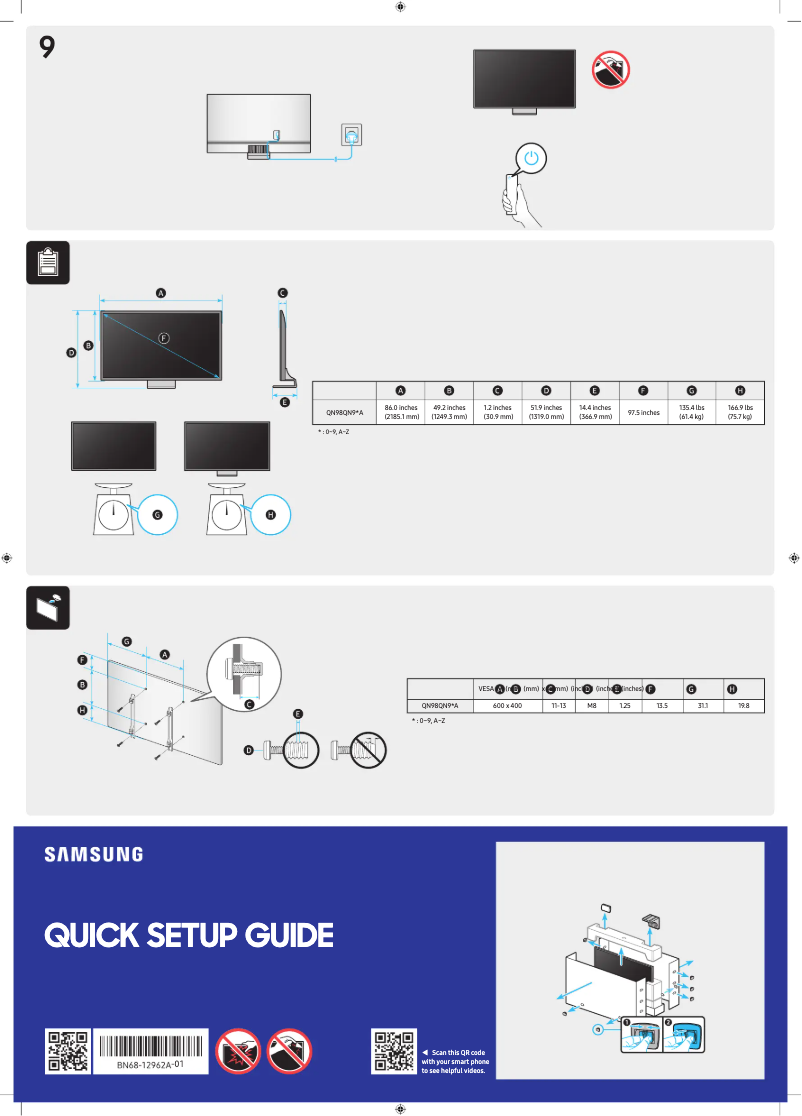
VESA standard200 x 200 mm
-
Launch year2021
-
Color of the standBlack
Packaging information
-
Package width1105 mm
-
Package depth144 mm
-
Package height687 mm
-
Package weight17600 g
Weight and dimensions
-
Width (without support)960.8 mm
-
Support depth222.6 mm
-
Height (support included)623.4 mm
-
Weight (with support)13800 g
-
Width (without support)960.8 mm
-
Height (without support)559.5 mm
-
Depth (without support)26.9 mm
-
Weight (without support)9200 g
-
Width of the support465 mm
-
Support depth222.6 mm
Special features
-
Hisense Technologies (AV/TV)Micro Dimming
-
Motion Xcelerator
Frequently Asked Questions
What is the recommended viewing distance for my Samsung TV?
What should I do if my TV is not receiving a signal?
What are the dimensions of my TV screen?
What does the acronym HDMI stand for?
Is it possible to connect devices from different brands via Bluetooth?
What is the screen size of the Samsung QN90A?
What is the resolution of the Samsung QN90A screen?
Why won't my TV turn on?
How do I connect external devices to the {television_model}?
Why can't I hear sound on my Samsung QN90A TV?
How do I access and navigate the Smart TV features?
Can I change the picture settings to enhance my viewing experience?
Does the Samsung QN90A have good energy efficiency?
What is the energy consumption of the Samsung QN90A over 1000 hours of use?
What is the diagonal screen size of the Samsung QN90A?
Does the Samsung QN90A support 4K Ultra HD resolution?
What display technology is used in the Samsung QN90A TV?
Is the manual for the Samsung QN90A available in French?
Similar products


More product categories from brand Samsung
Television and multimedia Samsung
Home appliances Samsung
Household appliances Samsung
Phones Samsung
Audio Samsung
Other Samsung
Interior Samsung
Tools Samsung
Software Samsung
More product types from brand Samsung


Presentation of product QN90A specifications from brand Samsung
General Information
The Samsung QN90A is a television from the Samsung brand, known for its innovation and quality in the home appliance sector. This model, identified by the code QN90A | GQ43QN90AATXZG, is designed to deliver optimal performance as well as an enhanced user experience. The EAN code, 0887276520889, 8806092663961, allows for unique identification of this product within the distribution network.
Power
The Samsung QN90A is rated G in terms of energy efficiency, both in SDR mode and HDR mode. This means that its use may incur higher energy costs compared to other more energy-efficient models. Its power consumption is 60 kWh for 1000 hours in SDR and 118 kWh in HDR. In standby mode, the device consumes only 2 W, which helps reduce energy expenses. The AC input voltage is 220-240 V, with a frequency of 50 to 60 Hz, ensuring compatibility with standard electrical systems.
Screen
The Samsung QN90A features a 43-inch (108 cm) screen offering a 4K Ultra HD resolution of 3840 x 2160 pixels. This television uses Neo QLED technology, which ensures exceptional picture quality with vibrant colors and rich contrasts. The 16:9 aspect ratio provides an immersive viewing experience. Although the native refresh rate is 50 Hz, it can reach 120 Hz, which is ideal for video gaming. The screen is also anti-reflective, allowing for better visibility even in bright sunlight.
Representation / Realization
The HDR technology of the Samsung QN90A includes HDR10+, HLG, and Quantum HDR 1500, offering images with enhanced contrasts and colors. The Samsung Contrast Enhancer image processing optimizes color and detail quality. It is compatible with the SmartThings app, facilitating its integration into a smart home ecosystem.
Audio
In terms of audio, the Samsung QN90A is equipped with Dolby Digital Plus decoders, ensuring an immersive sound experience. Features such as Q-Symphony and Object Tracking Sound (OTS+) enhance sound localization and audio synchronization. With an RMS power of 20 W, this television offers satisfactory sound quality for various multimedia content.
Smart TV
It is important to note that the Samsung QN90A does not offer Smart TV features. However, it includes some applications like Samsung TV Plus for streaming. The universal guide facilitates navigation, while screen mirroring allows projecting the display of other devices onto the television. Although it does not have an Internet TV feature, it supports HbbTV for accessing interactive services.
Connectivity
The television is equipped with several connectivity options, including 4 HDMI ports and 2 USB 2.0 ports, allowing for the connection of various devices. It also supports Wi-Fi 5 (802.11ac) and Bluetooth 4.2 for convenient wireless connections. Additionally, an Ethernet/LAN port is available for a stable network connection.
Design
The Samsung QN90A features a modern design with a sleek black finish. It is compatible with VESA mounting (200 x 200 mm), making wall installation easy. The launch year of this model is 2021, making it a contemporary choice for users.
Weight and Dimensions
The dimensions of the device, including the stand, are 960.8 mm in width, 623.4 mm in height, and 222.6 mm in depth. Its weight with the stand is 13.8 kg, ensuring stable and secure installation in various environments.
Special Features
The Samsung QN90A incorporates advanced technologies such as Micro Dimming and Motion Xcelerator, thereby enhancing the audio and visual experience while ensuring simplified control.


