

Manual of product SSL 12
Editorial note
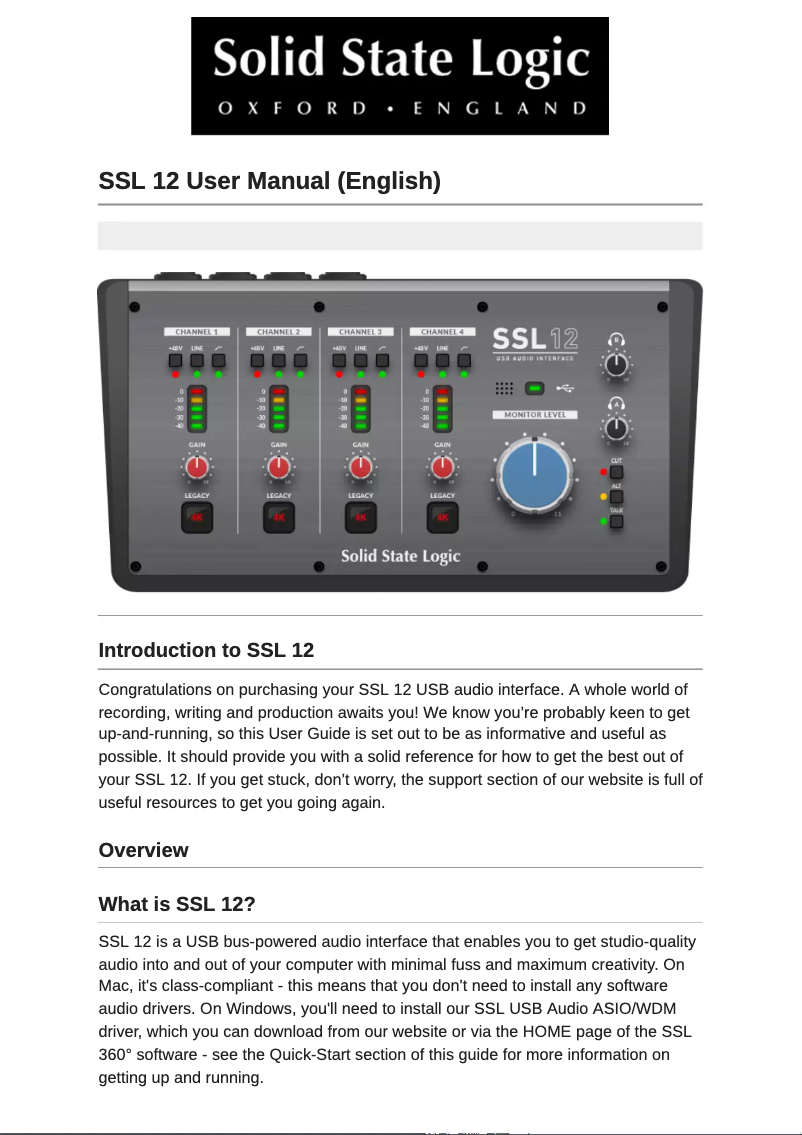
The Solid State Logic SSL 12 is a model that stands out for its quality and innovation, characteristics emblematic of the Solid State Logic brand. Designed for both professionals and amateurs, it offers an intuitive and enjoyable user experience, which is enhanced by exceptional sound performance, ideal for audio recordings and productions. However, the price of the SSL 12 may be a barrier for some users, as it is above the average of similar models on the market. Additionally, while the performance is optimal, the learning curve can be steep for those who are not familiar with professional audio equipment. Another point to consider is the connectivity, which may seem limited for some users wishing to integrate multiple devices into their setup. Furthermore, the weight and size of the SSL 12 can pose transport issues for those looking for more portable equipment. Finally, compatibility issues with certain operating systems or software have been reported, which may require additional adjustments. Overall, the Solid State Logic SSL 12 is a robust and high-performing product, but it is essential to weigh these advantages against its disadvantages before making a choice.Score details
User experience
The SSL 12 model is designed to provide an enhanced user experience, making it intuitive and enjoyable for both professionals and amateurs.
Performance
The optimal performance of the SSL 12 ensures exceptional sound quality, ideal for professional recordings and audio productions.
Value for money
The price of the Solid State Logic SSL 12 can be relatively high compared to other similar models on the market, which may deter some potential users.
Usability
Although the product is designed to deliver optimal performance, some users may find the learning curve a bit steep, especially those who are not familiar with professional audio equipment.
Features
The limited connectivity in terms of ports and input/output options may not meet the needs of all users, especially for those who wish to integrate multiple devices into their setup.
Robustness
The weight and size of the SSL 12 may pose transport and storage issues for users who need more portable equipment.
Support
With only one document available, the user manual, users can quickly access clear and precise instructions, thus facilitating the handling of the device.
compatibility
Some users have reported compatibility issues with certain operating systems or software, requiring additional adjustments or updates.
Advantages
Recognized quality and innovation
Intuitive use for everyone
Clear and accessible user manual
Exceptional sound quality
Easy integration into various environments
Disadvantages
Relatively high price for some users
Steep learning curve for beginners
Limited connectivity for multiple devices
Size and weight inconvenient for transport
Compatibility issues with certain software
Technical Specifications SSL 12
General Information
-
ModelSSL 12
-
Brand
-
Category
-
Type
-
SKU1745498
-
MPN1745498
Frequently Asked Questions
How can I turn on the SSL 12 console?
How do I adjust the input gain of a channel on the SSL 12?
What is the purpose of the VCA faders on the SSL 12 console?
How do I route an audio signal to the auxiliary sends on the SSL 12?
Can I save and recall specific settings on the SSL 12 console?
Is the Solid State Logic SSL 12 manual available in French?
Similar products


More product categories from brand Solid State Logic
More product types from brand Solid State Logic


Presentation of product SSL 12 specifications from brand Solid State Logic
General Information
The Solid State Logic SSL 12 is an iconic product from the Solid State Logic brand, known for its expertise and innovation in the professional audio sector. This model, the SSL 12, stands out for its exceptional performance and a user interface designed to provide a smooth and enjoyable experience for both professionals and passionate amateurs.
As a reference in the field, the SSL 12 guarantees superior sound quality, making this device particularly suitable for professional recordings and various audio productions. Its smart design allows for easy integration into different work environments, thus offering valuable flexibility for various types of projects.
Advantages
- Reliability and performance: Benefiting from the expertise of a renowned brand, the SSL 12 ensures unmatched audio quality.
- User experience: Its intuitive interface makes the device pleasant to use, facilitating quick handling.
- Accessible documentation: A clear user manual allows for quick access to necessary instructions.
- Flexibility: The product's design promotes its use in various professional contexts.
Disadvantages
- High price: The cost of the SSL 12 may seem prohibitive compared to other options on the market.
- Learning curve: Novice users of professional audio equipment may encounter some initial difficulties.
- Limited connectivity: The limited number of ports and input/output options may not suit all users, especially those wishing to integrate multiple devices.
- Portability: Its weight and dimensions may pose challenges for transport and storage.
- Compatibility issues: Some users have reported incompatibilities with certain operating systems or software, requiring adjustments.


