
Manuals of product Vaio VGN-FZ390
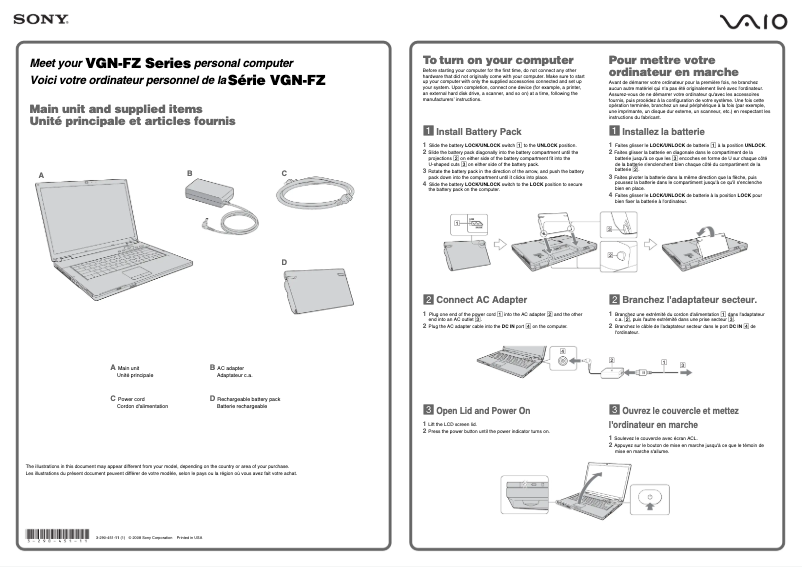

Editorial note
The Sony Vaio VGN-FZ390 is a laptop that stands out for the recognized build quality of the Sony brand. Designed to deliver optimal performance, it proves effective for a wide range of applications, whether for office work, browsing, or multimedia. Its ergonomic design and user-friendly features enhance the user experience, making it enjoyable and intuitive to use. However, some drawbacks deserve to be highlighted. The weight and bulk of the VGN-FZ390 can make it less practical for on-the-go use. Additionally, the battery life may be limited, requiring frequent recharges, especially during intensive use. The cooling system can also be noisy, which can be bothersome in quiet environments. Upgrading certain components can prove complicated, which might discourage users looking to customize their device. Finally, the price may seem high compared to other laptops with similar specifications. Overall, the Sony Vaio VGN-FZ390 offers good value for money and is supported by comprehensive documentation, making it easy to get started and ensuring safe use. It is a solid choice for students, professionals, and casual users, provided that its limitations in terms of portability and battery life are taken into account.Score details
User experience
The user experience is enhanced by ergonomic design and user-friendly features, making it enjoyable and intuitive to use.
Performance
Performance is optimal for various tasks, providing smooth usage for office work, browsing, and multimedia.
Battery life
Battery life can be limited, requiring frequent recharges, especially during intensive use.
Design
The design is modern, but the weight and bulk make the computer less practical for mobile use.
Value for money
The price may be considered high compared to other similar models on the market, which could deter some buyers.
repairability
Upgrading certain components can be complicated, which might discourage users wanting to customize their device.
Support
The product comes with comprehensive documentation, making it easy to get started and ensuring safe usage.
Advantages
Superior manufacturing quality
Reliable and smooth performance
Ergonomic and intuitive use
Comprehensive documentation provided
Versatile for various users
Disadvantages
Relatively heavy and bulky
Limited battery life
Noisy cooling system
Difficulty in updating components
High price compared to the competition
Technical Specifications Vaio VGN-FZ390
General Information
-
ModelVAIO VGN-FZ390
-
Brand
-
Category
-
Type
-
SKU1216104
-
MPN1216104
Frequently Asked Questions
What factors influence download speed on the Internet?
What are the measurements of my laptop screen?
What does the acronym HDMI stand for?
What is the best method to clean my laptop?
How can I clean my keyboard?
What is Bluetooth?
Is the manual for the Sony Vaio VGN-FZ390 available in French?
Similar products


More product categories from brand Sony
Audio Sony
Television and multimedia Sony
Computers and accessories Sony
Camera and photography Sony
Other Sony
Phones Sony
Software Sony
Interior Sony
More product types from brand Sony


Presentation of product Vaio VGN-FZ390 specifications from brand Sony
General Information
The Sony Vaio VGN-FZ390 laptop is a high-performance device designed by Sony, a renowned brand for its excellence and innovation in the tech world. This model, the Vaio VGN-FZ390, stands out for its optimal capabilities, providing an enhanced user experience thanks to its sleek design and advanced features.
Advantages
The Sony Vaio VGN-FZ390 is distinguished by its superior build quality, reflecting Sony's expertise. It ensures reliable performance for smooth usage, whether for office tasks, internet browsing, or multimedia activities. Its improved user experience results from an ergonomic design and intuitive features, making it enjoyable to use.
Moreover, it comes with a comprehensive documentation, including a user manual and safety instructions, thus facilitating the onboarding process. Its versatility makes it a wise choice for a wide range of users, whether they are students, professionals, or casual users.
Disadvantages
However, the Sony Vaio VGN-FZ390 has some disadvantages. Its design can make it relatively heavy and bulky, which is not ideal for those seeking a easily portable laptop. Additionally, the battery life may be limited, leading to frequent recharges, especially during intensive use.
The cooling system can also be noisy, which could be bothersome in quiet environments. The upgrades of certain components, such as RAM or hard drive, can prove complicated for the user to perform themselves, which may discourage those wishing to customize their device. Finally, the price of this model may be perceived as high compared to other laptops with similar specifications on the market.


