Thumbnail of product 2290 P Dynamic Digital Delay from brand TC Electronic
Logo of brand TC Electronic

Uncategorized TC Electronic 2290 P Dynamic Digital Delay

The TC Electronic 2290 P Dynamic Digital Delay is a high-quality audio processing device designed to provide an exceptional sound experience. Known for its innovation, TC Electronic has designed this model to ensure optimal performance in various usage contexts.

This dynamic digital delay allows for precise modulation of effects, thus offering creative flexibility to musicians and producers. Thanks to its advanced technology, the 2290 P ensures faithful reproduction of sounds, allowing you to add depth and richness to your compositions.

The TC Electronic 2290 P also comes with a user manual to facilitate its handling and use. Whether you are a sound professional or an enthusiast, this device adapts to your needs, allowing you to explore new sonic dimensions.

In summary, the TC Electronic 2290 P Dynamic Digital Delay is an essential tool for those looking to enrich their sound palette with high-quality delay effects.

Manual of product 2290 P Dynamic Digital Delay
8 10

Editorial note

The TC Electronic 2290 P Dynamic Digital Delay stands out for its exceptional sound quality, offering clarity and precision that enhance every musical performance. Its flexibility allows for the creation of a variety of delay effects, making it a versatile tool for musicians and producers. Additionally, its robust design ensures durability, making it suitable for intensive use on stage or in the studio. The user-friendly interface facilitates navigation and customization of settings, making this device accessible even to beginner users. However, the price may be a barrier for some, as it is relatively high compared to other digital delay models. Furthermore, the complexity of the features may require a learning curve, which could make usage less intuitive for new users. Some users have also reported compatibility issues with other audio equipment, limiting its integration into certain systems. Finally, while the product offers a variety of effects, it lacks some modern features, such as control via a mobile app, and its weight and size may make it less portable. In summary, the TC Electronic 2290 P Dynamic Digital Delay is an excellent choice for those seeking sound quality and flexibility, but it is important to consider the potential drawbacks before making a purchase. The detailed user manual included is an asset for maximizing the use of the device.

Score details

User experience

The user-friendly interface makes navigation and customization of settings easy, making it accessible even for beginners.

Performance

The sound quality is exceptional, with clarity and precision that enhance any musical performance.

Robustness

The robust design ensures that the product withstands intensive use on stage or in the studio.

Value for money

The price may be high compared to other models, which may not suit all budgets.

Features

The product offers flexibility of use with a variety of delay effects, but some modern features are lacking, such as control via a mobile app.

Usability

The complexity of the features may require a learning curve for beginner users, making it less intuitive to use.

Support

A detailed user manual is included, providing tips and tricks to maximize the use of the device.


Advantages

Clear and precise sound

Varied delay effects

Durable construction

Intuitive interface

User manual included

Disadvantages

High price compared to other models

Complex features for beginners

Compatibility issues with certain equipment

Unwieldy weight and size for transport

Lack of control via mobile app

Technical Specifications 2290 P Dynamic Digital Delay

General Information

Frequently Asked Questions

How to quickly set up the TC Electronic 2290 P Dynamic Digital Delay?
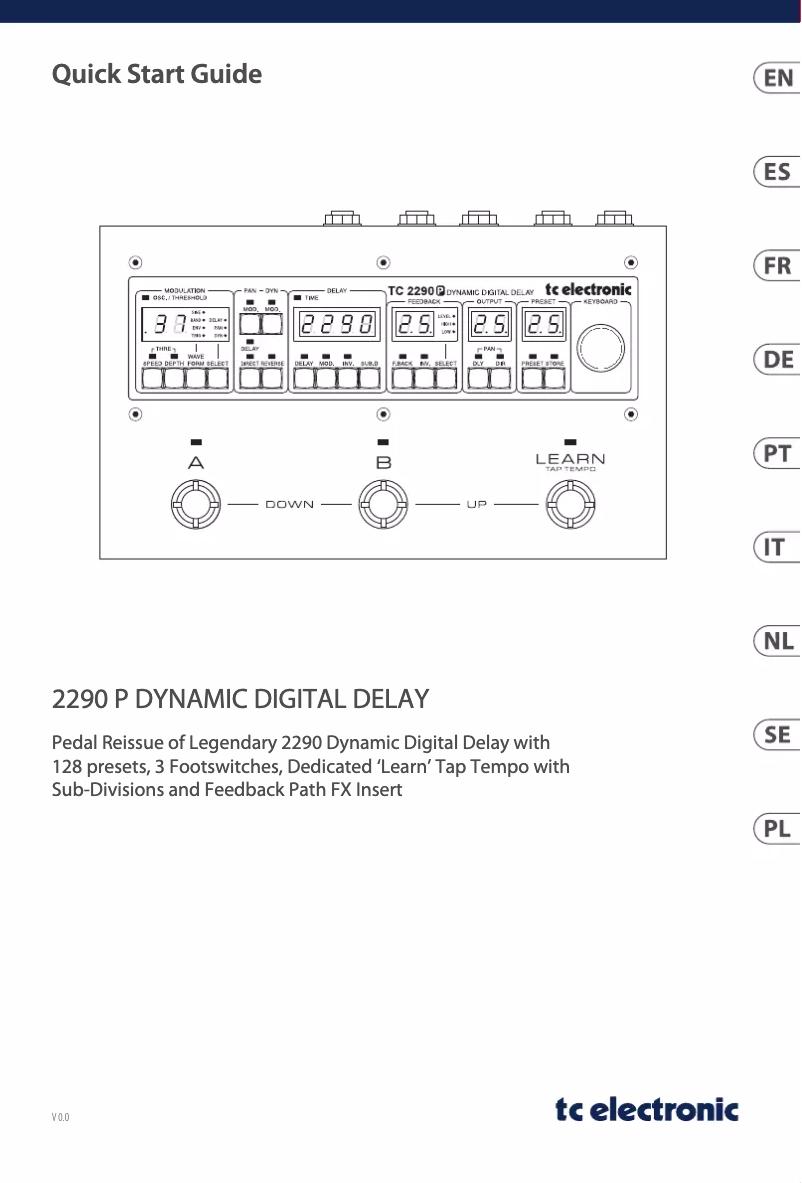
To quickly set up the TC Electronic 2290 P Dynamic Digital Delay, follow these steps: 1. Connect your guitar or instrument to the input of the 2290 P with a good quality instrument cable. 2. Connect the output of the 2290 P to your amplifier or audio interface using another instrument cable. 3. Connect the power adapter to the 2290 P and plug it into a wall outlet. 4. Turn on the power switch located on the side or back of the 2290 P. 5. Take time to familiarize yourself with the pedal controls, such as the delay time, feedback, and level knobs. 6. Use the 'Learn' tempo pedal to set the desired delay time by tapping in rhythm. 7. Explore the different presets available on the 2290 P to find the delay sound that suits you. 8. Adjust the feedback and level knobs to modulate the intensity and volume of the delay effect. 9. If necessary, connect pedals or other effect devices to the FX feedback loop. 10. Start playing your instrument and enjoy the dynamic digital delay effect offered by the TC Electronic 2290 P. Note that these steps are a general guide and may vary slightly depending on your setup and personal preferences.
How to modify the controls and settings of the 2290 P Dynamic Digital Delay?
To adjust the controls and settings of the TC Electronic 2290 P Dynamic Digital Delay, follow these steps: 1. Familiarize yourself with the controls on the pedal. The KEYBOARD encoder is used to adjust most parameters. Select a parameter by pressing a button, then turn the KEYBOARD encoder to modify it. 2. Use the PRESET section to navigate through the 64 tables. Press PRESET again to load the selected table or directly activate presets A or B with the footswitches. Each table contains 2 presets, A and B, for a total of 128 presets. 3. Adjust the output level of the delayed signal with the DLY knob. Press twice to activate the phase inversion of the output signal. 4. Use the DIR knob to set the output level of the direct signal. 5. Press the DLY and DIR buttons simultaneously to adjust the fixed pan between left and right using the PAN knob. 6. Use the SELECT button to choose the display or feedback setting. Press the F. BACK button to modify the selected feedback parameter, such as the number of repeats or the high/low cut filter. 7. Press the DELAY button to set the delay time. Hold it down for a quick adjustment. Use the MOD button to allow modulation of the delayed signal. 8. Use the SUB.D button to set the delay time as a subdivision of the tap tempo. Press the button to toggle between subdivision types and turn the KEYBOARD encoder to modify the subdivision. 9. The TIME indicator blinks to indicate the configured delay time. 10. Activate dynamic modulation with the DYN MOD button, and use the REVERSE button to reverse the effects of this modulation. 11. The DELAY/DIRECT button allows you to activate the pan of the delayed signal, the direct signal, or both. Adjust the amount of fixed pan by pressing the DLY and DIR buttons and turning the KEYBOARD encoder. 12. The PAN MOD button activates pan modulation. 13. In the MODULATION section, the SELECT button allows you to choose the display or setting of the modulation. Use the WAVEFORM button to browse the available waveforms. 14. Press the SPEED button to adjust the selected modulation parameter, and the DEPTH button to set the depth of the modulation. By holding SPEED and DEPTH simultaneously, you can adjust the threshold, applicable to certain waveforms. 15. Use the footswitches to activate presets, bypass the effect, or navigate through the preset list. 16. Connect external devices, such as an expression pedal or computer, via the available jacks (e.g., EXP, USB, MIDI). These steps provide a general guide for adjusting the controls and parameters of the TC Electronic 2290 P Dynamic Digital Delay. Specific functions may vary depending on your setup and preferences.
How to ensure compliance with FCC rules when using the 2290 P Dynamic Digital Delay?
To ensure compliance with FCC rules when using the TC Electronic 2290 P Dynamic Digital Delay, follow these steps: 1. Place the 2290 P away from other electronic devices, especially those that emit or receive radio signals, to reduce the risk of interference. 2. Use high-quality shielded cables to connect the 2290 P to your guitar, amplifier, or audio interface, which decreases the risk of electromagnetic interference. 3. Ensure that the power adapter provided with the 2290 P is suitable for your region and complies with local electrical safety standards. 4. Plug the power adapter directly into a grounded outlet. Avoid using extension cords or power strips that could cause electrical noise or current fluctuations. 5. If you experience interference or noise while using the 2290 P, try repositioning the pedal or adjusting the cables to mitigate the influence of electromagnetic interference. 6. If necessary, consult the troubleshooting section in the manual or contact TC Electronic customer service for further assistance regarding compliance issues. By following these recommendations, you will help ensure that your use of the TC Electronic 2290 P Dynamic Digital Delay complies with FCC rules related to electromagnetic interference.
How can I save and organize the presets of the 2290 P Dynamic Digital Delay via the app?
To save and organize the presets of the TC Electronic 2290 P Dynamic Digital Delay using the app, follow these steps: 1. Download the free 2290 P app from the TC Electronic website. 2. Install the app on your computer or mobile device. 3. Open the app and connect your TC Electronic 2290 P to your device via a USB cable. 4. In the app, you will find all the original presets of the 2290 P, as well as options to reconfigure settings for MIDI clock, tap tempo modes, and modifiers for the external expression pedal. 5. Browse the available presets in the app and select the ones you want to use or modify. 6. Customize the selected presets by adjusting various parameters and controls in the app. 7. Once you are satisfied with your changes, use the app to save them to the 2290 P. 8. Organize your presets by creating folders or categories in the app and assigning presets to them. 9. Use the app to easily switch between presets during your performances or recording sessions. 10. Explore the available MIDI CC features in the app to control the 2290 P remotely via external MIDI devices. By following these steps, you can effectively save and organize presets on the TC Electronic 2290 P Dynamic Digital Delay using the dedicated app.
What are the instructions for plugging the 2290 P Dynamic Digital Delay into a power outlet?
To connect the TC Electronic 2290 P Dynamic Digital Delay to a power outlet, follow these instructions: 1. Make sure to use the power adapter provided with the 2290 P, which should comply with the voltage requirements of your region (e.g., 100-240V AC). 2. Locate the power input on the 2290 P, usually found on the side or back of the pedal. 3. Plug one end of the power adapter into the power input of the 2290 P. 4. Plug the other end of the adapter into a standard electrical outlet. 5. Ensure that the outlet is grounded and capable of providing stable power. 6. Make sure the power switch on the 2290 P is set to "Off" before plugging it in. 7. Once the adapter is properly connected, turn on the power switch of the 2290 P. 8. Check that the LED indicators on the 2290 P light up, indicating that the pedal is powered. 9. If any issues or anomalies occur, check the power connections and refer to the troubleshooting section of the manual or contact TC Electronic customer support for further assistance. By following these instructions, you can safely plug the TC Electronic 2290 P Dynamic Digital Delay into a power outlet for optimal performance.
Is the manual for the TC Electronic 2290 P Dynamic Digital Delay available in French?
Yes, the manual for the TC Electronic 2290 P Dynamic Digital Delay is available in French.

Similar products


Discover the technical sheet of Hall of Fame 2 Reverb from TC Electronic and its manuals...
Available manuals:
Discover the technical sheet of Flashback Triple Delay from TC Electronic and its manuals...
Available manuals:
Discover the technical sheet of Beach from Sunny and its manuals...
Available manuals:
Discover the technical sheet of Vortex Mini Flanger from TC Electronic and its manuals...
Available manuals:
Discover the technical sheet of A030.139.01 from Sunny and its manuals...
Available manuals:
Discover the technical sheet of G-System from TC Electronic and its manuals...
Available manuals:
Discover the technical sheet of NV Goggles from Yukon and its manuals...
Available manuals:
Discover the technical sheet of Sandy from Sunny and its manuals...
Available manuals:
Discover the technical sheet of DITTO LOOPER from TC Electronic and its manuals...
Available manuals:
Discover the technical sheet of SZ-JB02 from Zojirushi and its manuals...
Available manuals:
Discover the technical sheet of NDR-1 Nova Drive from TC Electronic and its manuals...
Available manuals:
Discover the technical sheet of A030.139.00 from Sunny and its manuals...
Available manuals:

Presentation of product 2290 P Dynamic Digital Delay specifications from brand TC Electronic

General Information

The TC Electronic 2290 P Dynamic Digital Delay is an iconic device from the TC Electronic brand, known for its commitment to innovation and sound quality. This model of digital delay offers high-level performance, ensuring an enriching audio experience for users, whether they are musicians or producers.

Advantages

Exceptional sound quality: The TC Electronic 2290 P is recognized for its clarity and precision, allowing for faithful sound reproduction that enhances any musical performance.

Flexibility of use: This versatile model allows for the creation of a multitude of delay effects suited to various musical styles, thus offering great creative freedom.

Robust design: Built to withstand intensive use, the 2290 P is ideal for stages and studios, showcasing the brand's legendary durability.

User-friendly interface: Featuring an intuitive interface, this device makes navigation and customization of settings easy, making it accessible even for beginners.

User manual included: A detailed guide accompanies the product, providing tips and tricks to optimize the use of the device.

Disadvantages

High price: The TC Electronic 2290 P may be considered relatively expensive compared to other models of digital delays, which may not suit all budgets.

Complexity of features: Some advanced features may require some learning time for novice users, making initial use less intuitive.

Compatibility issues: Some users have encountered integration difficulties with other audio equipment, which may limit its use in certain systems.

Weight and size: Its design may make it less portable, constituting a disadvantage for musicians on the go.

Lack of modern features: The absence of control via mobile app may seem outdated to some users, compared to current market standards.