

Manual of product Camileo P20

Editorial note
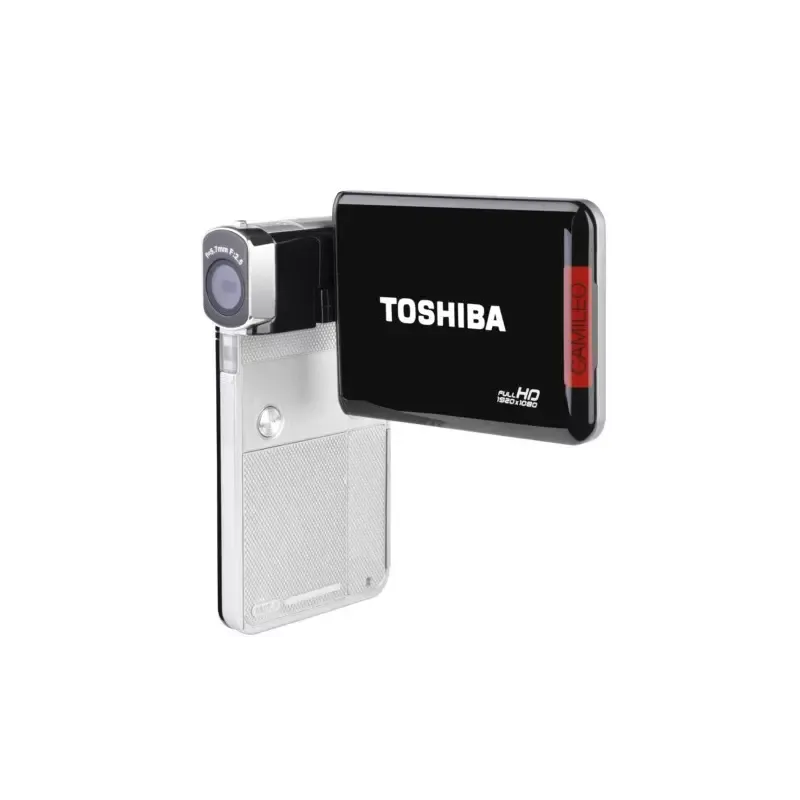
The Toshiba Camileo P20 stands out with several notable advantages. Its built-in image stabilizer ensures sharp videos and photos, even in motion, which is particularly beneficial for capturing action moments. With a 16x digital zoom, the device allows for precise details from a distance, providing appreciated flexibility during shooting. Its maximum video resolution of 1920 x 1080 pixels guarantees exceptional image quality for recordings, making visual memories even more memorable. Additionally, the 3-inch LCD screen facilitates the viewing and composition of content. However, the Camileo P20 also presents some limitations. The 5 MP image sensor may seem insufficient against current standards, which can affect photo quality in certain conditions. Furthermore, the lack of optical zoom reduces the ability to capture precise details during distant shots. The internal memory of only 128 MB is very limited, requiring the use of memory cards for adequate storage. The battery life, which is not specified, could also pose a problem during prolonged use. Finally, the absence of a viewfinder can complicate image composition in bright light. Overall, the user experience is positive thanks to a modern and sleek design, but limited compatibility with recent operating systems may restrict its use with modern computers. In conclusion, the Toshiba Camileo P20 offers good value for money for those looking for a portable camcorder with interesting features, despite some limitations on image quality and storage.Score details
User experience
The user experience is generally positive thanks to an effective image stabilizer and a 3-inch LCD screen, making it easier to view and compose photos and videos.
Performance
The performance is satisfactory for Full HD video recordings, but the 5 MP sensor may limit photo quality in certain conditions.
Battery life
The battery life is not specified, which can be problematic for prolonged use without the possibility of recharging.
Design
The modern and sleek design of the Toshiba Camileo P20 gives it an attractive look, although the lack of a viewfinder may complicate image composition.
Value for money
The value for money is fair, but the internal memory of only 128 MB and the absence of optical zoom limit the flexibility and effective use of the product.
Features
Features such as the 16x digital zoom and compatibility with memory cards up to 64 GB offer great flexibility for users, despite some limitations.
Support
The available documentation is helpful, but limited compatibility with recent operating systems may restrict its use with modern computers.
Advantages
Image stabilizer for sharp videos
16x digital zoom for precise details
Exceptional 1920 x 1080 pixel resolution
3-inch LCD screen for easy viewing
Compatible with SD cards up to 64 GB
Disadvantages
5 MP limited sensor for photos
Absence of optical zoom for detail
Insufficient internal memory of 128 MB
Unspecified battery life
No viewfinder for bright light
Limited compatibility with recent systems
Technical Specifications Camileo P20
General Information
-
ModelCAMILEO P20
-
Brand
-
Category
-
Type
-
SKU89753
-
MPN89753
Objective system
-
Digital zoom16 x
-
Optical zoom- x
-
Image stabilizerYes
-
Interchangeable objectiveNo
Image sensor
-
Total megapixels5 MP
-
Sensor typeCMOS
-
Optical sensor size-
Other features
-
Lens focal lengthF2.5
-
Auto focusYes
-
Auto focusYes
-
InterfaceUSB 2.0
-
Internal memory128 MB
-
Minimal disk space1024 MB
-
Minimal processorPentium 4, 2.4GHz
-
Minimum RAM512 MB
-
Compatible operating systemsWindows XP, Vista, 7
-
Minimum system requirements4 x CD-ROM
-
USB
Screen
-
Screen resolution960 x 240 pixels
-
ScreenLCD
-
Screen size3 "
-
Built-in screenYes
Flash
-
Integrated light-
-
Built-in flashYes
Tuning
-
Focusing Area, normal1.5 - ∞ m
-
Macro focusing range0.2 m
White balance
-
White balanceAuto
-
Daylight
-
Fluorescent
-
Tungsten
Video
-
Maximum cadence60 ips
-
Analog signal format systemNTSC, PAL
-
Maximum video resolution1920 x 1080 pixels
-
Supported video formatMP4
-
Type HDFull HD
Image capture
-
Photo capture resolution2048 x 1536
-
Supported image formats3264 x 2448
-
Maximum image resolution4608 x 3456
-
JPG
-
4608 x 3456 pixels
Audio
-
Built-in microphoneYes
Camera
-
Automatic delay device10 s
-
Photo modeYes
-
Type of camcorderPortable camcorder
-
3D CompatibilityNo
Connectivity
-
Component output1
-
Component output1
-
HDMIYes
-
Video output-SNo
-
Video output-SNo
-
Number of USB 3.2 Gen 1 (3.1 Gen 1) type A ports0
-
Number of USB 3.2 Gen 1 (3.1 Gen 1) type A ports0
-
Number of USB 3.2 Gen 1 (3.1 Gen 1) type A ports0
Storage support
-
Compatible memory cardsSD, SDHC, SDXC
-
Maximum memory card size64 GB
-
Type of camcorder supportMemory card, NAND
-
Memory locations1
-
Internal storage capacity0.128 GB
-
Video cassette typeNo
-
Video cassette typeNo
Weight and dimensions
-
Weight151 g
-
Width74 mm
-
Depth22 mm
-
Height111 mm
Design
-
Product colorBlue
-
Indigo
Battery
-
Battery technologyLithium-Ion (Li-Ion)
-
Maximum battery life- h
-
Battery capacity- mAh
-
Battery typePX 1728
Sightfinder
-
Camera viewfinderUnavailable
Frequently Asked Questions
What is a megapixel?
What does the abbreviation "MP" mean?
What is the weight of the Toshiba Camileo P20?
What is the screen size of the Toshiba Camileo P20?
What is the height of the Toshiba Camileo P20?
What is the screen resolution of the Toshiba Camileo P20?
What is the width of the Toshiba Camileo P20?
What is the depth of the Toshiba Camileo P20?
What is the storage capacity of the Toshiba Camileo P20?
What is the digital zoom of the Toshiba Camileo P20?
How many megapixels does the Toshiba Camileo P20 have?
What is the focal range of the lens of the Toshiba Camileo P20?
What type of sensor is used in the Toshiba Camileo P20?
What is the maximum video resolution of the Toshiba Camileo P20 camcorder?
How to navigate through the different sections of the user manual?
What to do if I cannot find the quick start guide provided with the product?
How to install the software from the CD provided with the product?
What to do if I have problems with the ArcSoft Media Impression software?
What are the steps to make a warranty claim for the Camileo P20 camcorder?
Is the manual for the Toshiba Camileo P20 available in French?
Similar products




More product categories from brand Toshiba
Home appliances Toshiba
Audio Toshiba
Phones Toshiba
Other Toshiba
Interior Toshiba
More product types from brand Toshiba








Presentation of product Camileo P20 specifications from brand Toshiba
General Information
The Toshiba Camileo P20 is a camcorder from the Toshiba brand, known for its innovation and quality in the electronics sector. This model, identified by the code PX1756E-1CAM, is designed to provide an optimal user experience and reliable performance. The EAN code, 4026203862364 and 4026203888746, allows for precise identification of the product in the distribution circuit.
Lens System
This camcorder is equipped with a 16x digital zoom, allowing for the capture of distant details with clarity. Although it does not have optical zoom, the built-in image stabilizer ensures sharp photos and videos, even in motion. However, it is worth noting that it does not have an interchangeable lens, limiting some creative options.
Image Sensor
The Toshiba Camileo P20 features a CMOS sensor with a resolution of 5 megapixels, ensuring images of acceptable quality for everyday use, although this may seem limited compared to current standards. The size of the sensor also contributes to the sharpness of the images, although it is not specified.
Other Features
The lens focal length is F2.5, favoring shots with adequate depth of field. Thanks to automatic exposure and auto focus, the camera adjusts brightness and focus for perfectly balanced images. Regarding connectivity, it is equipped with a USB 2.0 interface for fast data transfer. Its internal memory is 128 MB, which may be insufficient for intensive use, hence the need for memory cards. The minimum required processor is a Pentium 4 at 2.4 GHz, with 512 MB of RAM, ensuring acceptable operation on compatible operating systems such as Windows XP, Vista, and 7.
Screen
The 3-inch LCD screen offers a resolution of 960 x 240 pixels, allowing for pleasant and practical viewing when composing photos and videos. Its integrated design makes it easy to use in the field.
Flash
The Toshiba Camileo P20 is equipped with a built-in flash, ideal for shooting in low-light conditions, although the presence of an integrated light is not specified.
Focusing
For focusing, the normal range is 1.5 m to infinity, while the macro focusing range is 0.2 m, allowing for the capture of fine details up close.
White Balance
The camcorder offers several white balance options, including Auto, Cloudy, Daylight, Fluorescent, Incandescent, and Manual, facilitating color adjustment according to lighting conditions.
Video
The maximum video resolution is 1920 x 1080 pixels, with a frame rate of up to 60 fps, allowing for smooth video recording. It supports NTSC and PAL formats, as well as the MP4 video format, ensuring compatibility with various multimedia devices.
Image Capture
For photo capture, the Toshiba Camileo P20 offers a maximum resolution of 4608 x 3456 pixels, with supported image formats in JPG, ensuring good image quality. The various available resolutions allow for adapting shots according to needs.
Audio
This model is equipped with a built-in microphone, ensuring clear sound capture, ideal for audio recordings and video conversations.
Camera
The camcorder features a 10-second self-timer, allowing for greater flexibility for remote shots. A photo mode is also present, although 3D compatibility is not available.
Connectivity
The Toshiba Camileo P20 includes a 2.0 USB port and an HDMI output, facilitating connection to other devices for content sharing. However, it does not support certain modern features like PictBridge or video-S output.
Storage Support
Compatible with SD, SDHC, and SDXC memory cards up to 64 GB, this camcorder allows for sufficient storage for your videos and photos. Its internal capacity of 128 MB will need to be supplemented with memory cards for intensive use.
Weight and Dimensions
Weighing 151 g, the Toshiba Camileo P20 is lightweight and easily portable. Its dimensions of 74 mm wide, 22 mm deep, and 111 mm high make it a compact device, ideal for shooting on the go.
Design
This camcorder features an indigo blue hue, giving it a modern and attractive appearance.
Battery
The battery is of the hybrid nickel-metal (NiMH) type, ensuring acceptable performance, although the maximum autonomy is not specified. The battery type is PX 1728, ensuring sufficient usage time for short shooting sessions.
Viewfinder
It is worth noting that the viewfinder is unavailable, which may complicate composition in bright lighting conditions.


