

Manual of product Camileo P25

Editorial note
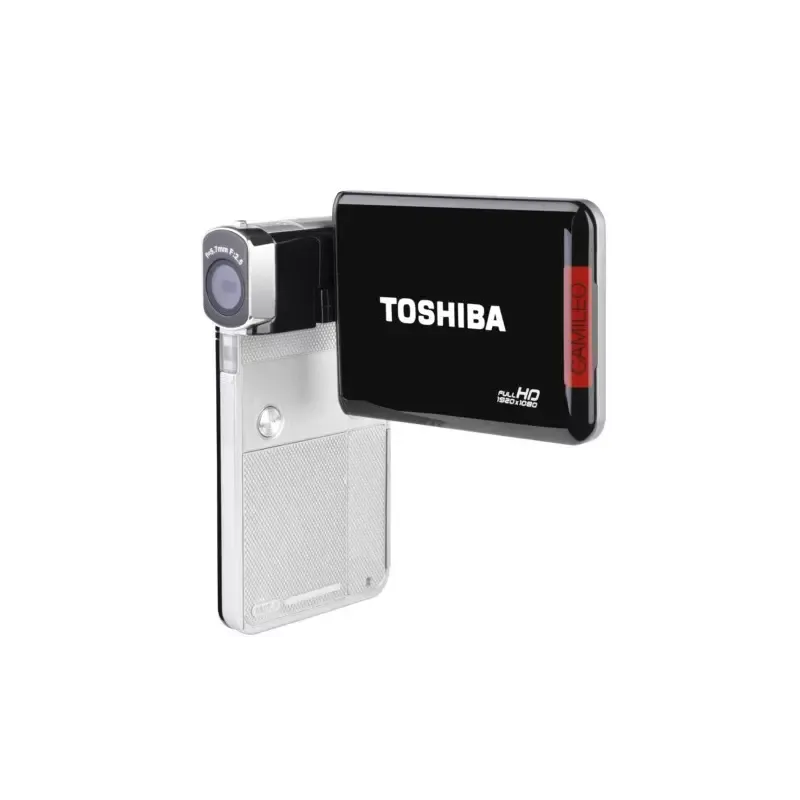
The Toshiba Camileo P25 stands out for its exceptional image quality, thanks to its 5 MP CMOS sensor and a maximum image capture resolution of 4608 x 3456 pixels. These features allow users to take sharp and detailed photos and videos. Additionally, its 3-inch LCD screen with a resolution of 230400 pixels and its touchscreen functionality provide an intuitive and immersive user experience, making it easier to view and take photos. The built-in electronic image stabilizer (EIS) is another notable advantage, ensuring smooth videos and photos even while in motion. The various scene modes, such as Night, Sport, or Portrait, offer flexibility in use, allowing for optimized shots according to the environment and subject. However, the Camileo P25 has some drawbacks. Its internal storage capacity limited to 0.125 Go can quickly become insufficient for users who need a lot of space for their videos and photos. Moreover, the lack of an HDMI port limits connectivity options, making it difficult to stream high-definition videos to external screens. The battery life, although using NiMH technology, is only 2.25 hours, which may not be enough for extended recording sessions. Finally, the absence of a viewfinder can complicate precise framing when taking photos or videos in bright sunlight. In summary, the Toshiba Camileo P25 is a solid choice for those looking for a portable camcorder with good performance, but its limitations in terms of storage and connectivity may pose issues for some users.Score details
User experience
The 3-inch LCD screen with a resolution of 230,400 pixels and touch functionality ensures an intuitive and immersive user experience when viewing and taking photos.
Performance
The image quality is remarkable thanks to a 5 MP CMOS sensor, with a maximum image capture resolution of 4608 x 3456 pixels, allowing for sharp and detailed photos and videos.
Features
The built-in electronic image stabilizer (EIS) ensures smooth videos and photos even in motion, and the various scene modes offer flexibility of use depending on the environment.
Battery life
Although the battery technology is NiMH, the maximum runtime of only 2.25 hours may not be sufficient for extended recording sessions.
connectivity
The absence of an HDMI port limits connectivity options for streaming high-definition videos to external screens.
storage
The internal storage capacity is very limited at 0.125 GB, which may be insufficient for users needing a lot of space for their videos and photos.
Usability
The viewfinder is unavailable, which can make precise framing difficult when taking photos or videos in bright sunlight.
Advantages
Image quality 5 MP, 4608 x 3456 pixels
Electronic image stabilizer for smooth videos
Various scene modes to optimize shots
3-inch touchscreen LCD
Compatibility with SD cards up to 64 GB
Disadvantages
Internal storage limited to 0.125 GB
No HDMI port for connectivity
No viewfinder for framing
Battery life of only 2.25 hours
No 3D functionality available
Technical Specifications Camileo P25
General Information
-
ModelCAMILEO P25
-
Brand
-
Category
-
Type
-
SKU89754
-
MPN89754
Image sensor
-
Sensor typeCMOS
-
Total megapixels5 MP
-
Optical sensor size1/3.2
Objective system
-
Interchangeable objective-
-
Optical zoom- x
-
Digital zoom16 x
-
Image stabilizerYes
-
Type of image stabilizerElectronic Image Stabilization (EIS)
Storage support
-
Internal storage capacity- Go
-
Type of camcorder supportMemory card, NAND
-
Flash memory0.125 Go
-
Compatible memory cardsSD, SDHC, SDXC
-
Memory locations1
-
Maximum memory card size64 Go
Exposure to light
-
ISO Sensitivity1600
-
Type of exposureCar
-
Scene modesBacklight, Night
White balance
-
White balanceAuto
-
Daylight
-
Fluorescent
-
Tungsten
Flash
-
Built-in flashYes
-
Integrated lightNo
Screen
-
Screen size3 "
-
Touch screen
-
ScreenYes
-
Digital display resolutionLCD
-
Touch screen230400 pixels
-
Yes
Sightfinder
-
Camera viewfinderUnavailable
Camera
-
Type of camcorderCamcorder
-
Automatic delay device10 s
-
Minimum illumination3 lux
-
3D CompatibilityNo
Design
-
Product colorBlack
Video
-
Maximum video resolution1920 x 1080 pixels
-
Video resolutions640 x 480, 1280 x 720, 1920 x 1080 pixels
-
Supported video formatH.264, MP4
-
Analog signal format systemNTSC, PAL
-
Type HDFull HD
Image capture
-
Maximum image resolution4608 x 3456 pixels
-
Photo capture resolution2048 x 1536, 2592 x 1944, 4608 x 3456
-
Supported image formatsJPG
Connectivity
-
PictBridge-
-
Headset output-
-
Number of USB 3.2 Gen 1 (3.1 Gen 1) type A ports0
-
Video output-SNo
-
Video output-SNo
-
Number of USB 3.2 Gen 1 (3.1 Gen 1) type A ports0
-
Quantity of mini-USB 2.0 ports1
-
Number of USB 3.2 Gen 1 (3.1 Gen 1) type A ports0
-
Quantity of mini-USB 2.0 ports1
-
Quantity of mini-USB 2.0 ports1
Battery
-
Battery technology-
-
Maximum battery life2.25 h
-
Battery capacity- mAh
Weight and dimensions
-
Width74 mm
-
Depth22 mm
-
Height111 mm
-
Weight151 g
Frequently Asked Questions
What is a megapixel?
What does the abbreviation "MP" represent?
What is the weight of the Toshiba Camileo P25?
What is the size of the screen on the Toshiba Camileo P25?
What is the height of the Toshiba Camileo P25?
What is the width of the Toshiba Camileo P25?
What is the depth of the Toshiba Camileo P25?
What is the storage capacity of the Toshiba Camileo P25?
Does the Toshiba Camileo P25 have a CMOS sensor?
How many megapixels does the Toshiba Camileo P25 have in total?
Does the Toshiba Camileo P25 have image stabilization?
Can the Toshiba Camileo P25 record on various types of memory cards?
Does the Toshiba Camileo P25 have a built-in flash?
How do I turn on the Toshiba Camileo P25 camcorder?
Why can't my Toshiba Camileo P25 camcorder record videos?
How do I transfer videos from the Toshiba Camileo P25 to a computer?
Why are the images blurry on the Toshiba Camileo P25 camcorder?
How do I adjust the volume on the Toshiba Camileo P25 camcorder?
Is the manual for the Toshiba Camileo P25 available in French?
Similar products




More product categories from brand Toshiba
Home appliances Toshiba
Audio Toshiba
Phones Toshiba
Other Toshiba
Interior Toshiba
More product types from brand Toshiba








Presentation of product Camileo P25 specifications from brand Toshiba
General Information
The Toshiba Camileo P25 is a camcorder from the renowned brand Toshiba, known for its quality and innovation in the electronics sector. This model, identified by the code Camileo P25 | PX1771E-2CAM, is designed to deliver superior performance and enhance the user experience. The EAN code 4026203955189 allows for the identification of this product in the distribution system.
Image Sensor
Equipped with a CMOS sensor, the Toshiba Camileo P25 ensures remarkable image quality. With a resolution of 5 megapixels, it allows you to capture sharp and detailed photos. The sensor size, measuring 1/3.2 inches, also contributes to producing high-quality images.
Lens System
The camcorder features a 16x digital zoom, making it easier to capture details from a distance. Thanks to its electronic image stabilizer (EIS), your videos and photos remain sharp even in motion, which is particularly useful for dynamic shots. However, the model does not offer interchangeable optics, which limits certain creative possibilities.
Storage Support
The internal storage capacity is 0.125 GB, which may be insufficient for users wishing to record numerous videos or photos. The Camileo P25 uses SD, SDHC, and SDXC memory cards, with a maximum capacity of 64 GB, allowing for flexible storage tailored to the varied needs of users.
Light Exposure
With an ISO sensitivity of up to 1600, the camcorder adjusts effectively to various lighting conditions. It offers an automatic exposure mode that optimizes depth of field and shutter speed. The different scene modes, such as Night, Sport, and Portrait, allow for adjustments based on the environment.
White Balance
The Camileo P25 offers several white balance options, including Auto, Cloudy, Daylight, and more, allowing you to adjust the color temperature for realistic images.
Flash
This camcorder is equipped with a built-in flash, ideal for capturing clear images in low-light conditions. However, it does not have a built-in light to illuminate the environment.
Screen
Featuring a 3-inch LCD screen with a resolution of 230400 pixels, the Toshiba Camileo P25 provides an immersive visual experience. Its touchscreen functionality makes navigation intuitive and facilitates photo taking.
Viewfinder
The camcorder does not have a viewfinder, which can complicate framing, especially in bright sunlight.
Camera
This model is a portable camcorder, ideal for capturing moments with ease. It includes a 10-second self-timer, allowing for remote photo taking. Its minimum illumination of 3 lux ensures adequate performance even in poorly lit environments.
Design
The Toshiba Camileo P25 is presented in an elegant black hue, giving it a modern and understated look.
Video
This camcorder offers a maximum video resolution of 1920 x 1080 pixels, ensuring excellent image quality. It also supports several video resolutions, including 640 x 480, 1280 x 720, and 1920 x 1080 pixels. The supported video formats include H.264 and MP4, allowing for smooth and high-quality playback.
Image Capture
The maximum image resolution is 4608 x 3456 pixels, providing photos with remarkable clarity and precision. The supported image format is JPG, ensuring optimal quality for sharing and printing.
Connectivity
The Camileo P25 does not have an HDMI port, which limits certain connectivity options. However, it includes a mini-USB 2.0 port for quick connection with other devices. The headphone output allows for easy connection of headphones for an optimized audio experience.
Battery
Using a nickel-metal hybrid (NiMH) battery, the camcorder offers a maximum battery life of 2.25 hours, which may be limited for extended sessions.
Weight and Dimensions
The Toshiba Camileo P25 measures 74 mm in width, 22 mm in depth, and 111 mm in height. Weighing 151 g, it is lightweight and easy to carry, ideal for users on the go.


