

Manual of product P-4030 MFP

Editorial note
The Utax P-4030 MFP stands out for its impressive performance, notably a printing speed of 40 pages per minute, ideal for high-volume work environments. Its laser printing technology and maximum resolution of 600 x 600 DPI ensure superior print quality, producing vibrant documents and images. Additionally, the color copying feature with a speed of 40 copies per minute and the ability to resize copies offer flexibility and convenience. However, this device has some drawbacks. The lack of fax functionality may be a barrier for users who need it for sending documents. Furthermore, double-sided scanning is not offered, which limits efficiency when scanning multi-page documents. Although its printing speed is competitive, the warm-up time of 21 seconds can slow down printing tasks in a very active work environment. Its weight of 21,500 g also complicates moving or installing it in some offices, and the absence of Wi-Fi connectivity limits wireless connection options. Overall, the user experience is positive, with an intuitive interface and optimized paper management. The value for money is satisfactory given the features, although the mentioned limitations may not suit all users. The available user manual is comprehensive and facilitates the setup and use of the printer.Score details
User experience
The user experience is overall positive, with an intuitive interface and optimized paper management.
Performance
The performance is excellent with a printing speed of 40 ppm and superior print quality thanks to laser technology.
Design
The design is modern, but its weight of 21,500 g can make it difficult to move.
Value for money
The value for money is satisfactory given the features, although the lack of a fax machine and Wi-Fi may be a disadvantage for some users.
Features
The features are solid, but the lack of duplex scanning and Wi-Fi connectivity limits its use in certain contexts.
Documentation
The user manual is available and provides comprehensive information for setup and use.
Advantages
Fast printing: 40 pages per minute
Laser quality: 600 x 600 DPI
Color copying: 40 copies per minute
Paper capacity: 500 sheets
Ethernet connectivity and multi-OS compatibility
Disadvantages
No fax feature
No duplex scanning
21 seconds warm-up time
Heavy device to move
Lack of Wi-Fi connectivity
Technical Specifications P-4030 MFP
General Information
-
ModelP-4030 MFP
-
Brand
-
Category
-
Type
-
SKU270622
-
MPN270622
Print speed
-
Printing technologyLaser
-
PrintingMonochrome printing
-
Print speed (black, normal quality, A4/US Letter)40 ppm
-
Maximum resolution600 x 600 DPI
-
Duplex printing speed (Black, normal quality, A4/US Letter)20 ppm
-
Copy time for the first page (Black, normal)9 s
-
Preheating time21 s
-
Double-sided printingYes
Copier
-
CopySimple copy
-
Max. resolution of copies600 x 600 DPI
-
Copy speed (normal quality, black, A4)40 cpm
-
Resizing copy25 - 400 %
-
Maximum number of copies999 copies
-
Release time of the first print (black, normal)9 s
Digitization
-
DigitizationColor scanning
-
Optical scanning resolution600 x 600 DPI
-
Maximum scan areaA4 (210 x 297) mm
-
Scan toE-mail, FTP, SMB, USB
-
Scanning speed (color)30 ppm
-
Scanner speed (black)40 ppm
-
Duplex scanning speed (color)13 ppm
-
Duplex scanning speed (black)17 ppm
-
Supported image formatsJPG, TIF
-
Support for text formatsPDF, XPS
-
Scan driversTWAIN, WIA
-
Double-sided scanningYes
Fax
-
FaxNo
Features
-
Digital sender-
-
Service cycle (Maximum)- pages per month
-
Printing colorsBlack
-
Languages of the page descriptionEpson LQ, IBM ProPrinter, PCL 5c, PCL 5e, PCL 6, PCL XL, PDF 1.7, PostScript 3
Network
-
Wifi-
-
Mobile printing technologies-
-
Authentication methodSMTP
-
Ethernet/LANYes
-
LAN Ethernet: data transfer rate10,100,1000 Mbit/s
-
Support for network protocols (IPv4)TCP/IP
-
Wiring technology10/100/1000Base-T(X)
Representation / realization
-
Built-in memory card reader-
-
Processor model465S
-
Processor frequency667 MHz
-
Internal memory512 MB
-
Integrated into the processorYes
-
Processor familyPowerPC
Input and output capacity
-
Total power capacity500 sheets
-
Paper feed typeCassette
-
Input capacity of multi-purpose trays100 sheets
-
Total output capacity250 sheets
-
Multifunctional trayYes
Paper management
-
ISO, Format Series A (A0...A9)A4
-
Type of paper tray supportOrdinary paper
-
ISO, Format Series A (A0...A9)A4
-
Weight of the multifunctional tray support60 - 220 g/m²
-
Support weight supported in duplex mode60 - 120 g/m²
Design
-
Screen-
-
Product colorBlack
-
Market positionGrey
-
Professional
Connectivity
-
Direct printing-
-
Standard interfacesEthernet
-
USB portUSB
-
Yes
Power
-
Electricity consumption (average operation)679 W
-
Electricity consumption (stop)2.6 W
-
Energy consumption (standby mode)53.7 W
-
AC input frequency50 Hz
-
AC input voltage220 - 240 V
Minimum system requirements
-
Support for the Windows operating systemWindows 7 Home Basic
-
Support for the Mac operating systemWindows 7 Home Basic x64
-
Support for other operating systemsWindows 7 Home Premium
-
Support for the server operating systemWindows 7 Home Premium x64
-
Support for other operating systemsWindows 7 Professional
-
Windows 7 Professional x64
-
Windows 7 Starter
-
Windows 7 Starter x64
-
Windows 7 Ultimate
-
Windows 7 Ultimate x64
-
Windows 8
-
Windows 8 Enterprise
-
Windows 8 Enterprise x64
-
Windows 8 Pro
-
Windows 8 Pro x64
-
Windows 8 x64
-
Windows 8.1
-
Windows 8.1 Enterprise
-
Windows 8.1 Enterprise x64
-
Windows 8.1 Pro
-
Windows 8.1 Pro x64
-
Windows 8.1 x64
-
Windows Vista Business
-
Windows Vista Business x64
-
Windows Vista Enterprise
-
Windows Vista Enterprise x64
-
Windows Vista Home Basic
-
Windows Vista Home Basic x64
-
Windows Vista Home Premium
-
Windows Vista Home Premium x64
-
Windows Vista Ultimate
-
Windows Vista Ultimate x64
-
Windows XP Home
-
Windows XP Home x64
-
Windows XP Professional
-
Windows XP Professional x64
-
Mac OS X 10.5 Leopard
-
Mac OS X 10.6 Snow Leopard
-
Mac OS X 10.7 Lion
-
Mac OS X 10.8 Mountain Lion
-
Mac OS X 10.9 Mavericks
-
Yes
-
Windows Server 2003
-
Windows Server 2008 R2
-
Windows Server 2012 R2
-
Yes
Weight and dimensions
-
Width475 mm
-
Depth455 mm
-
Height575 mm
-
Weight21500 g
Frequently Asked Questions
What is the weight of the Utax P-4030 MFP?
What is the recommended method for removing jammed paper from the printer?
Why does my printer not recognize the original cartridges?
What are the possible reasons for poor print quality?
How does a laser printer differ from an inkjet printer?
Why is my inkjet printer producing black streaks?
What does the acronym DPI mean?
What is the height of the Utax P-4030 MFP?
What is the width of the Utax P-4030 MFP?
What is the depth of the Utax P-4030 MFP?
Is the manual for the Utax P-4030 MFP available in French?
Similar products



More product categories from brand Utax
More product types from brand Utax

Presentation of product P-4030 MFP specifications from brand Utax
General Information
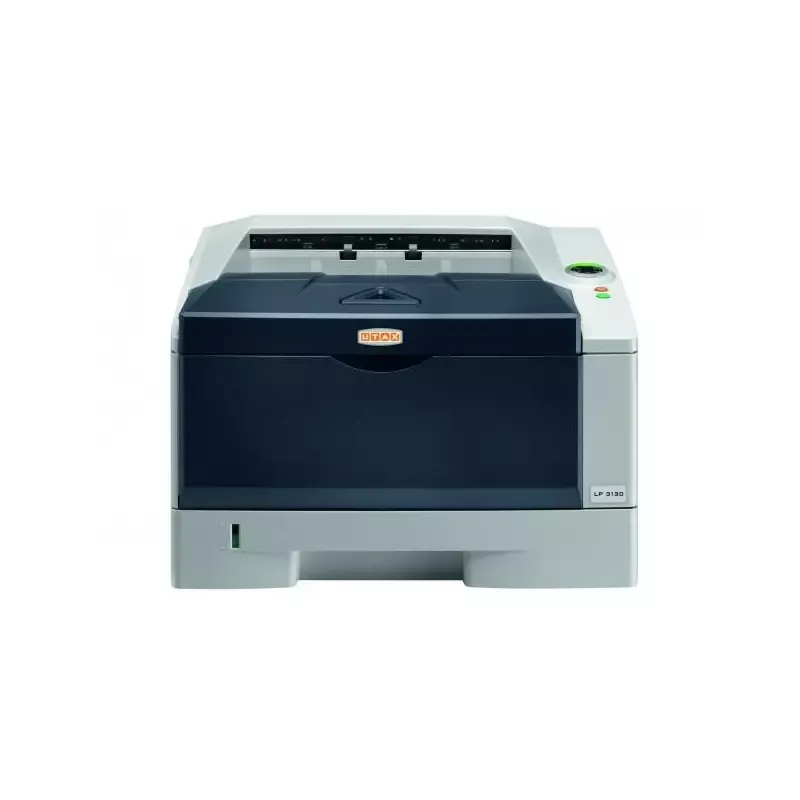
The Utax P-4030 MFP printer is a model recognized for its reliability and performance, specially designed by the Utax brand, which stands out for its innovation in the office equipment sector. The P-4030 MFP | 614004031 model promises an enhanced user experience thanks to its multiple features.
Print Speed
The Utax P-4030 MFP uses laser printing technology, ensuring superior print quality with vibrant colors and precise details. Its print speed reaches 40 pages per minute (ppm) for black and white documents, making it particularly suitable for high-volume work environments. The maximum resolution of 600 x 600 DPI ensures sharp and professional prints. In duplex mode, the speed is 20 ppm, thus optimizing the execution time of printing tasks. The first page output time is only 9 seconds, while the warm-up time is 21 seconds.
Copier
The integrated copier of the Utax P-4030 MFP offers a color copy function with the same resolution of 600 x 600 DPI, ensuring faithful reproductions. With a speed of 40 copies per minute (cpm) in black and white, it effectively meets daily demands. The resizing of copies is flexible, ranging from 25% to 400%, and it can produce up to 999 copies in a single operation, which is convenient for various tasks.
Scanning
This printer also offers a color scanning function with an optical resolution of 600 x 600 DPI, ensuring high-quality scanned documents. The maximum scan area is A4 size (210 x 297 mm), and the scanning speed is 30 ppm in color and 40 ppm in black. Although the product does not support duplex scanning, it allows sending scanned files via various protocols such as E-mail, FTP, SMB, and USB.
Fax
It is worth noting that the Utax P-4030 MFP does not have a fax function, which may be a disadvantage for some users who need this feature for sending documents.
Features
The maximum service cycle of this printer is suitable for intensive use, although the exact figure is not specified. The print color is primarily black, ensuring optimal clarity. Supported page description languages include Epson LQ, IBM ProPrinter, PCL, and PostScript, allowing adaptation to user preferences.
Network
In terms of connectivity, the Utax P-4030 MFP is equipped with an Ethernet port, facilitating integration into various networks. Although it does not offer Wi-Fi connectivity, the data transfer rate of 10/100/1000 Mbit/s ensures a fast and efficient network connection. Supported network protocols include TCP/IP, ensuring optimal print management.
Representation / Performance
The processor model used is the 465S, with a frequency of 667 MHz and an internal memory of 512 MB, ensuring smooth operation. This model is integrated into the processor, ensuring increased efficiency.
Input and Output Capacity
The total paper capacity of the Utax P-4030 MFP is 500 sheets, with a multifunction tray allowing versatile use. The multipurpose tray has a capacity of 100 sheets, and the output capacity is 250 sheets, ensuring efficient management of printed documents.
Paper Management
This printer is compatible with ISO A series paper sizes, up to A4, and supports paper weights ranging from 60 to 220 g/m², allowing for a wide range of printing applications.
Design
With a modern aesthetic, the Utax P-4030 MFP is available in black and gray, making it suitable for any professional office environment.
Connectivity
It is equipped with standard interfaces, including a USB port, facilitating connection to various devices. However, the lack of direct printing features may limit some connectivity options for users wishing to print wirelessly.
Power
The power consumption during operation is 679 W, while it drops to 2.6 W in standby mode, thus contributing to energy savings. The AC input voltage is 220 - 240 V, suitable for standard electrical systems.
Minimum System Requirements
The Utax P-4030 MFP is compatible with several operating systems, including various versions of Windows, Mac OS X, and Linux, thus offering flexibility of use for different computing environments.
Weight and Dimensions
With dimensions of 475 mm in width, 455 mm in depth, and 575 mm in height, the weight of the device is 21,500 g, which may pose a challenge for its mobility and installation in some offices.


