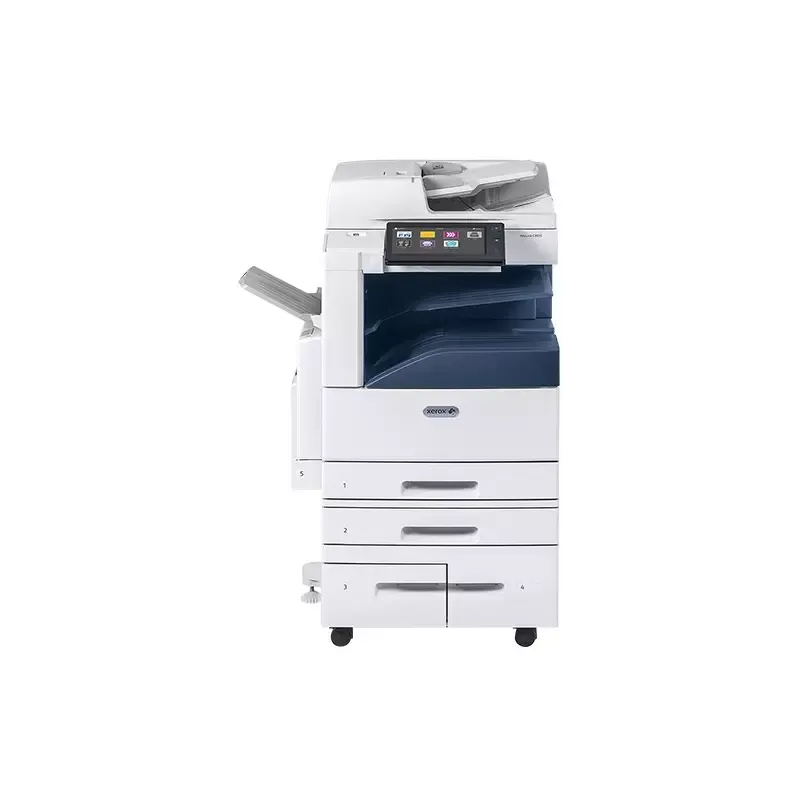

Manual of product C8030

Editorial note
The Xerox C8030 is a professional-quality printer that stands out for its speed and performance. With a printing speed of 30 pages per minute and a maximum resolution of 1200 x 2400 DPI, it ensures vibrant and precise color prints, ideal for demanding work environments. Its varied features, such as booklet printing and poster creation, meet the diverse needs of users, while the color scanning capability with automatic duplex scanning enhances office efficiency. However, the purchase cost can represent a significant investment, which may deter small businesses or individual users. Additionally, the lack of a double-sided scanning function may limit efficiency when scanning double-sided documents, requiring additional manual processing. The unspecified dimensions and weight could also make the installation and movement of the printer more difficult in confined spaces. In terms of user experience, the intuitive interface and varied features are well-rated, with a score of 85. The device's performance is also high, achieving a score of 80. However, the value for money is a weak point with a score of 65, mainly due to the acquisition cost. The features tailored to professional needs received an impressive score of 90, despite some limitations. Finally, the available documentation, while detailed, remains to be evaluated in terms of support. Overall, the Xerox C8030 is a solid choice for professionals seeking a high-performing printer, provided that its cost and specifications are taken into account.Score details
User experience
The user experience is positive thanks to an intuitive interface and various features, such as booklet printing and poster creation.
Performance
The performance is excellent with a printing speed of 30 ppm and a maximum resolution of 1200 x 2400 DPI, ensuring high-quality prints.
Design
The design is modern and professional, but the unspecified dimensions and weight may pose installation issues.
Value for money
The purchase cost can be high, which could be a barrier for small businesses or individual users.
Features
The features are varied and suited to professional needs, but the lack of a duplex scanning function may limit efficiency.
Documentation
The user manual is available with a total of 369 pages, providing detailed information for optimal use.
Advantages
Fast printing at 30 pages per minute.
Print quality of 1200 x 2400 DPI.
Various features for different needs.
Efficient automatic duplex color scanning.
Built-in Ethernet/LAN network connectivity.
Disadvantages
High purchase cost for small businesses.
Insufficient scanning resolution.
No duplex scanning.
Weight and dimensions complicate installation.
Limited printing capacity of 250 sheets.
Technical Specifications C8030
General Information
-
ModelC8030
-
Brand
-
Category
-
Type
-
SKU1136317
-
MPN1136317
Print speed
-
Printing technologyLaser
-
PrintingColor printing
-
Print speed (black, normal quality, A4/US Letter)30 ppm
-
Black print resolution1200 x 2400 DPI
-
Black print resolution1200 x 2400 DPI
-
Black print resolution1200 x 2400 DPI
-
Copy time for the first page (Black, normal)5.3 s
-
Copy time for the first page (color, normal)6.5 s
-
Stored print functionYes
-
Stored print functionYes
-
Stored print functionYes
-
Stored print functionYes
-
Stored print functionYes
-
Stored print functionYes
Copier
-
CopyColor copy
-
Release time of the first print (black, normal)6.7 s
-
Release time of the first print (color, concept)8.1 s
-
Max. resolution of copies600 x 600 DPI
-
Automatic adjustment functionYes
-
Automatic adjustment functionYes
-
Automatic adjustment functionYes
-
Automatic adjustment functionYes
Digitization
-
DigitizationColor scanning
-
Duplex scanning modeAuto
-
Optical scanning resolution- DPI
-
Type of scannerFlatbed and ADF scanner
-
Scan toE-mail, FTP, SMB, USB
-
Supported image formatsJPEG, TIFF
-
Support for text formatsPDF, XPS
-
Double-sided scanningYes
Fax
-
Fax-
Features
-
Digital sender-
-
Service cycle (Maximum)- pages per month
-
Number of print cartridges4
-
Service cycle (recommended)0 - 90000 pages per month
-
Printing colorsBlack, Cyan, Magenta, Yellow
-
Languages of the page descriptionPCL 3, PCL 5c, PCL 6, PDF 1.7
-
Deferred printingYes
Sustainability
-
Sustainability certificatesENERGY STAR
Design
-
Market positionProfessional
-
Product colorWhite
-
Color displayYes
-
Color displayYes
-
Color displayYes
-
Order typeTouchscreen
Other features
-
Printer managementXerox Standard Accounting
Network
-
Wifi-
-
Mobile printing technologies@PrintByXerox
-
Contactless paymentApple AirPrint
-
LAN Ethernet: data transfer rateMopria Print Service
-
Security-supported algorithmYes
-
Contactless payment10,100,1000 Mbit/s
-
Wiring technology256-bit AES, FIPS 140-2, HTTPS, SHA-256, SNMPv3, SSL/TLS
-
Yes
-
10/100/1000Base-T(X)
Connectivity
-
USB portYes
-
USB portYes
-
Optional connectivityWireless LAN
Representation / realization
-
Built-in memory card readerNo
-
Integrated into the processorYes
-
Processor frequency1910 MHz
-
Number of processor cores4
-
Internal storage capacity250 GB
-
Internal memory8000 MB
-
Processor familyIntel Atom®
Input and output capacity
-
Total power capacity- sheets
-
Maximum output capacity250 sheets
-
Paper feed typeCassette, Paper tray
-
Maximum input capacity3140 sheets
-
Total number of power supply units5
-
Input capacity of multi-purpose trays100 sheets
-
Maximum output capacity250 sheets
-
Multifunctional trayYes
Minimum system requirements
-
Support for the Mac operating systemMac OS X 10.10 Yosemite
-
Support for the Linux operating systemMac OS X 10.11 El Capitan
-
Support for the server operating systemMac OS X 10.8 Mountain Lion
-
Support for the Windows operating systemMac OS X 10.9 Mavericks
-
Ubuntu 14.04
-
openSUSE 13.1
-
Windows Server 2003 R2
-
Windows Server 2008 R2
-
Windows Server 2012 R2
-
Windows Server 2012 R2 x64
-
Windows 10
-
Windows 7
-
Windows 8
-
Windows 8.1
-
Windows Vista
Paper management
-
Maximum ISO A series paper sizeA3
-
ISO, Format Series A (A0...A9)A3, A4, A6
-
Envelope sizesC5
-
Type of paper tray supportHeader
-
Maximum print format320 x 483 mm
Weight and dimensions
-
Height- mm
-
Height- mm
-
Height- mm
-
Weight- g
Power
-
Electricity consumption (average operation)W
Frequently Asked Questions
What is the weight of the Xerox C8030?
What is the best method to remove paper jammed in the printer?
Why is my printer not recognizing the original cartridges?
What are the possible causes of poor print quality?
What is the difference between a laser printer and an inkjet printer?
Why does my inkjet printer leave black streaks on prints?
What does the acronym DPI mean?
How many cartridges can the Xerox C8030 hold?
What is the height of the Xerox C8030?
What is the width of the Xerox C8030?
What is the depth of the Xerox C8030?
What is the storage capacity of the Xerox C8030?
Why is my Xerox C8030 not working?
How can I troubleshoot paper jam issues on my Xerox C8030?
What should I do if the print quality of my documents is unsatisfactory?
Why is my Xerox C8030 displaying an error code?
How do I scan a document with my Xerox C8030?
Does the Xerox C8030 use laser printing technology?
Does the Xerox C8030 support color printing?
Does the Xerox C8030 support duplex scanning?
What is the print speed of the Xerox C8030?
Is the manual for the Xerox C8030 available in French?
Similar products


More product categories from brand Xerox
Other Xerox
More product types from brand Xerox


Presentation of product C8030 specifications from brand Xerox
General Information
The Xerox C8030 model is a printer from the renowned brand Xerox, known for its innovation and quality in the field of office equipment. With a unique identification via the EAN code 0095205845051, this model ensures optimal performance, meeting the varied needs of professional users.
Print Speed
Equipped with Laser printing technology, the Xerox C8030 offers high-quality color printing, guaranteeing vibrant visual results. Its print speed reaches 30 pages per minute in black mode (normal quality, A4/US Letter), ideal for daily use. With a maximum resolution of 1200 x 2400 DPI, it produces documents with remarkable clarity in both black and color.
Print times are also competitive: 5.3 seconds for the first page in black and 6.5 seconds for color. Among its features, the printer allows for booklet printing, posters, and offers secure and stored printing, facilitating document management.
Copier
The Xerox C8030 also excels as a copier, providing color prints that are true to the originals. The first black print is available in 6.7 seconds, while for color, the delay is 8.1 seconds. Its copy resolution reaches 600 x 600 DPI, ensuring optimal print quality.
It includes practical functions such as temporary document storage, edge enhancement, and the option to copy ID cards.
Scanning
The color scanning function allows for the creation of accurate and vibrant digital copies. The Xerox C8030 offers an automatic duplex scanning mode for efficient double-sided scanning. Although the scanning resolution is not specified, it is compatible with various image formats such as JPEG and TIFF, as well as text formats like PDF and XPS.
Fax
The built-in fax machine allows for quick sending and receiving of documents, although specific details about its features are not provided.
Features
The maximum service cycle of the Xerox C8030 is suited for high print volume, meeting the needs of demanding work environments. With four print cartridges, it ensures consistent quality. Additionally, it supports multiple page description languages, guaranteeing adaptability to different operating systems.
Durability
The Xerox C8030 is certified ENERGY STAR, attesting to its energy efficiency and compliance with environmental standards.
Design
Designed for professional use, this model features a modern and elegant white finish. It is equipped with a color touchscreen that facilitates its use, making access to features intuitive.
Network and Connectivity
The Xerox C8030 supports various mobile printing technologies, offering flexibility in use. It is equipped with Ethernet/LAN ports and allows for wireless connections, ensuring easy integration into modern office environments. Data security is enhanced through algorithms such as 256-bit AES and SSL/TLS.
Paper Management
With a maximum input capacity of 3140 sheets, the Xerox C8030 is designed to handle large volumes of documents. It supports multiple paper formats, including A3, A4, and various types of envelopes, ensuring great versatility for all your printing needs.
Minimum System Requirements
Compatible with various operating systems, including Windows, Mac, and Linux, the Xerox C8030 ensures smooth integration into diverse environments. This allows users to enjoy an enriching experience, regardless of the system used.


