

Manuals of product Phaser 7760
Editorial note
The Xerox Phaser 7760 is a printer that stands out for its exceptional print quality, making this device an ideal choice for businesses that need to produce professional documents and high-quality presentations. Its optimal performance, with fast printing speed, meets the demands of dynamic work environments. The user experience is facilitated by the included documents, such as the user manual and installation guide, making the setup accessible even for less experienced users. Additionally, the advanced technology integrated into the Phaser 7760 enhances the overall experience, perfectly adapting to the needs of professionals. However, it is worth noting that the initial purchase cost is relatively high, which can be a barrier for small businesses or individual users. The toner cartridges, while essential for its operation, can also incur significant operating costs over the long term. Furthermore, its weight and size can complicate its installation in tight spaces. In terms of repairability, the Xerox Phaser 7760 is built to last, thus minimizing maintenance costs. However, some repairs may require a certain level of technical knowledge, which can be a hurdle for some users. Despite these drawbacks, the printer remains a solid investment for those seeking a reliable and high-performing solution.Score details
User experience
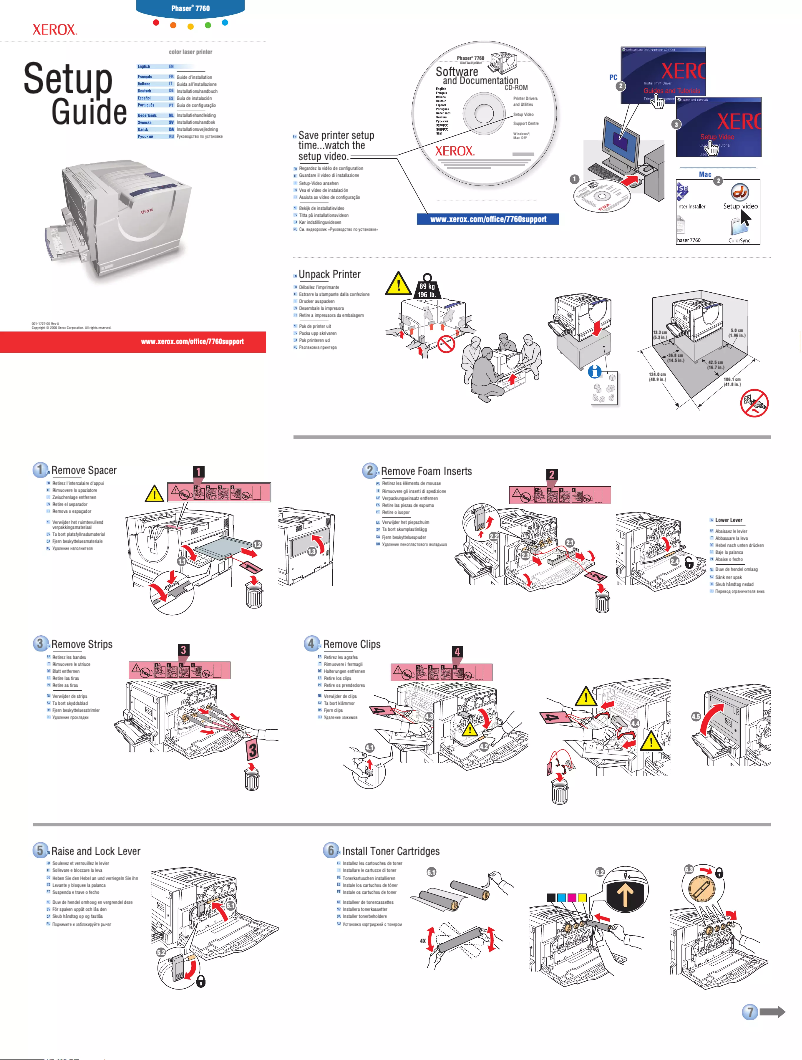
The user experience is enhanced by a clear user manual and installation guide, making commissioning simple even for the less experienced.
Performance
Performance is optimal, with fast printing speed, ideal for work environments requiring increased efficiency.
Value for money
The initial purchase cost is high and toner cartridges can incur significant operating costs, which may be a barrier for some businesses.
Design
The printer is robust but its weight and size can pose installation issues in tight spaces.
Features
Integrates advanced technologies that enhance the user experience and meet the needs of professionals with modern features.
repairability
Built to last, which minimizes maintenance and replacement costs, but may require technical knowledge for certain repairs.
Usability
Usage is generally simple, but may require a certain level of technical knowledge for installation and configuration.
Advantages
High-quality prints.
Fast printing speed.
Simplified installation and use.
Modern and innovative features.
Durable and reliable construction.
Disadvantages
High initial purchase cost.
Expensive and frequent toner cartridges.
Bulky and heavy printer.
Technical installation required.
Sometimes long printing time.
Technical Specifications Phaser 7760
General Information
-
ModelPHASER 7760
-
Brand
-
Category
-
Type
-
SKU1369993
-
MPN1369993
Frequently Asked Questions
What is the recommended method for removing a jammed paper from the printer?
Why is my printer not recognizing the original cartridges?
What are the possible reasons for poor print quality?
What is the difference between a laser printer and an inkjet printer?
Why is my inkjet printer producing black lines on my prints?
What does the acronym DPI mean?
Is the manual for the Xerox Phaser 7760 available in French?
Similar products


More product categories from brand Xerox
Other Xerox
More product types from brand Xerox


Presentation of product Phaser 7760 specifications from brand Xerox
General Information
The Xerox Phaser 7760 is a product of the renowned brand Xerox, known for its commitment to quality and innovation in the printing device sector. This model, the Phaser 7760, stands out for its remarkable performance and its ability to enhance the printing experience for users. The associated EAN code for this device, namely 0095205225365, 0095205225396, 0095205225945, allows for unique identification in distribution systems.
Advantages
Among the many strengths of the Xerox Phaser 7760, we note:
- Exceptional print quality: This device produces prints with remarkable clarity and precision, ideal for professional documents or presentations.
- Optimal performance: Designed for heavy use, it ensures high printing speed and efficiency that meet the demands of dynamic work environments.
- Ease of use: Accompanied by a detailed user manual, this model allows for easy installation and handling, even for novice users.
- Advanced technology: The Phaser 7760 incorporates modern features, illustrating Xerox's ongoing innovation in printing.
- Durability and reliability: Built to withstand the test of time, this device represents a wise investment for companies looking to reduce their maintenance and replacement costs.
Disadvantages
Despite its many advantages, the Xerox Phaser 7760 also has some drawbacks:
- High initial cost: Acquiring this device can represent a significant investment, especially for small businesses or individual users.
- Toner cartridge cost: The cartridges can be relatively expensive and may require frequent replacements, thus increasing long-term expenses.
- Dimensions and weight: Its design can make it bulky and heavy, complicating installation in tight spaces or transport.
- Technical skill level: Installation and setup may require technical knowledge, which could pose a challenge for some users.
- Printing time: For certain types of documents, especially when multiple tasks are launched simultaneously, the printing time may be longer than expected.


