

Manual of product Redmi 13C 5G
Editorial note
The Xiaomi Redmi 13C 5G positions itself as an attractive smartphone thanks to its 5G connectivity, offering remarkably fast download and internet browsing speeds. This feature, combined with optimized performance, allows for smooth multitasking and demanding applications. Additionally, Xiaomi's reputation for reliability and innovation enhances user trust in this product, while its intuitive interface improves the user experience. However, the Redmi 13C 5G has some drawbacks. The camera quality may disappoint some users seeking high-quality photos, and the interface, while functional, may seem cluttered for those accustomed to other operating systems. The battery life, although adequate, may not suffice for intensive use, and the limited internal storage may require the addition of a microSD card for users wanting to install many applications. In terms of design, although modern, it lacks originality compared to other models on the market. Despite these minor flaws, the value for money is excellent, especially due to features tailored to contemporary needs and the availability of a user manual that facilitates onboarding for new users. In summary, the Xiaomi Redmi 13C 5G is a wise choice for those looking for a high-performing smartphone at an affordable price, while keeping its limitations in mind.Score details
User experience
The user experience is generally positive thanks to an intuitive interface and features tailored to modern needs, although some users may find it cluttered.
Performance
Performance is optimized for everyday tasks and demanding applications, providing a smooth and responsive experience.
Battery life
Battery life is adequate, but may not be sufficient for intensive use throughout the day.
Design
The design is modern, but may lack originality compared to other smartphones on the market.
Value for money
The value for money is excellent, especially with 5G connectivity and the performance offered by the product.
Features
The features offered are well-suited to the needs of modern users, although the camera quality may disappoint.
Support
The availability of a user manual makes it easier for new users to get started and provides support.
Advantages
5G connectivity for fast speeds
Smooth performance for efficient multitasking
Brand reliability and innovation
Intuitive and accessible user interface
Included manual for easy handling
Disadvantages
Inferior quality camera compared to the competition
Cluttered and unintuitive user interface
Insufficient battery life for intensive use
Limited internal storage, requires microSD
Modern design but lacking originality
Technical Specifications Redmi 13C 5G
General Information
-
ModelREDMI 13C 5G
-
Brand
-
Category
-
Type
-
SKU1870697
-
MPN1870697
Frequently Asked Questions
How to reset my Xiaomi Redmi 13C 5G?
What to do if my SIM card is too small for my Xiaomi phone?
What is the role of an IMEI number?
What are the dimensions of my smartphone's screen?
Is there a risk of my smartphone's battery exploding?
How to increase the memory of my Xiaomi Redmi 13C 5G?
How to create a Xiaomi account on my Xiaomi Redmi 13C 5G?
How to set up Google services on my Xiaomi Redmi 13C 5G?
How to manage accounts and synchronization on my Xiaomi Redmi 13C 5G?
How to access services and provide feedback on my Xiaomi Redmi 13C 5G?
Is the user manual for the Xiaomi Redmi 13C 5G available in French?
Similar products


More product categories from brand Xiaomi
Phones Xiaomi
Other Xiaomi
Home appliances Xiaomi
Audio Xiaomi
Interior Xiaomi
Personal care Xiaomi
Tools Xiaomi
More product types from brand Xiaomi





Presentation of product Redmi 13C 5G specifications from brand Xiaomi
General Information
The Xiaomi Redmi 13C 5G is a smartphone from the renowned brand Xiaomi, known for its innovation and quality in the technology sector. This model, the Redmi 13C 5G, ensures optimal performance to meet the demands of modern users, whether for multitasking, gaming, or streaming.
Advantages
One of the main features of the Xiaomi Redmi 13C 5G is its 5G connectivity, allowing for significantly improved download and internet browsing speeds. This feature is particularly appreciated by users who consume multimedia content or play online.
This smartphone is also designed to offer optimized performance, ensuring smooth usage even with demanding applications. Thanks to its intuitive user interface, it provides an enhanced user experience, making interaction with the phone enjoyable and accessible.
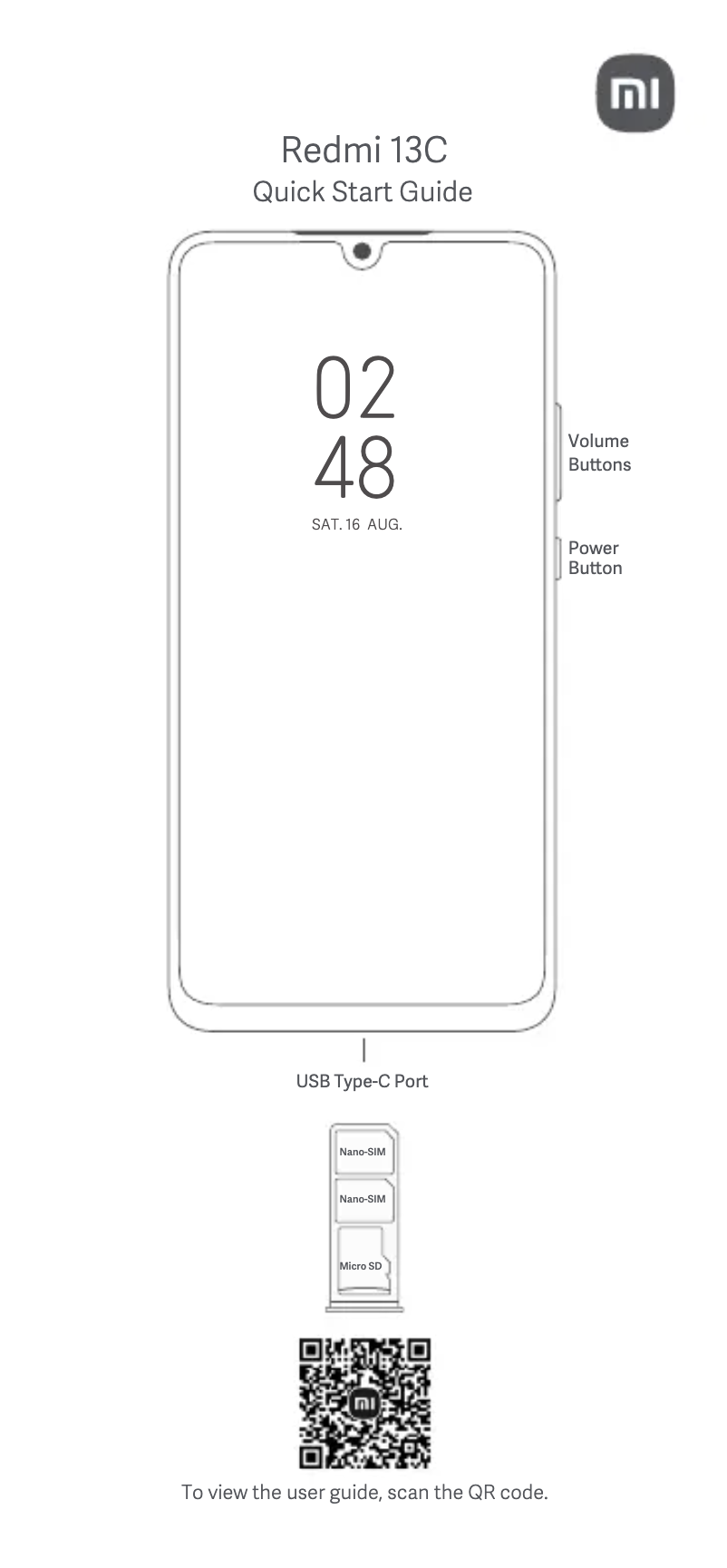
Moreover, the inclusion of a user manual makes it easier for new users to get accustomed, allowing them to quickly discover the various features of the phone.
Disadvantages
Despite its many strengths, the Xiaomi Redmi 13C 5G has some drawbacks. The camera quality may be considered inferior compared to other models in the same range, which could disappoint photography enthusiasts. Additionally, while the user interface is functional, it may seem cluttered to some users, especially those accustomed to other operating systems.
The battery life, while adequate, may not be sufficient for intensive use, particularly for those who consume a lot of multimedia content. The internal storage may also prove limited, requiring the use of a microSD card for those who wish to install many applications or back up files. Finally, although its design is modern, it may lack originality and not stand out visually in a saturated market.


