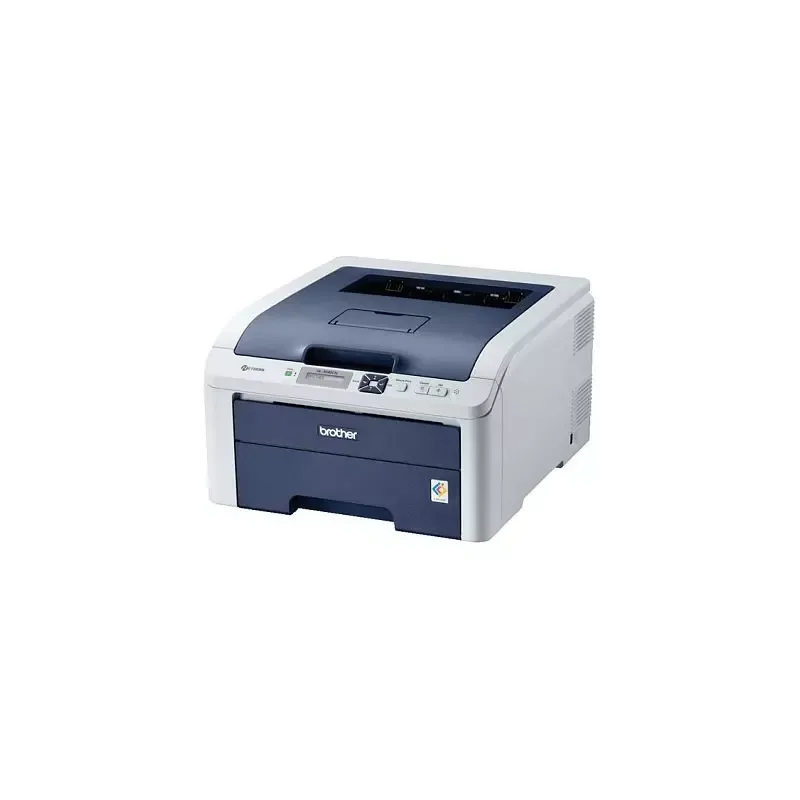

Manual of product HL-3040CN

Editorial note
The Brother HL-3040CN printer stands out for its satisfactory printing performance, offering a speed of 16 pages per minute in both black and color, while ensuring a maximum resolution of 2400 x 600 DPI. This print quality, combined with LED technology, makes it an ideal choice for professional and personal documents. Its 250-sheet paper capacity also allows for handling a significant volume without interruption, which is an asset for demanding work environments. However, there are some drawbacks to consider. The lack of duplex printing can lead to higher paper consumption, which may not be suitable for environmentally conscious users. Additionally, the internal memory of only 32 MB could limit efficiency when printing complex documents. The weight of 19 kg may also complicate handling and moving the printer, especially in tight spaces. Finally, the absence of Wi-Fi connectivity limits wireless connection options. Regarding user experience, compatibility with various operating systems, including Windows, Mac, and Linux, is a positive point. However, the lack of Wi-Fi may be a disadvantage for some users. The value for money is considered reasonable, although the mentioned limitations may diminish its appeal. Overall, the Brother HL-3040CN is well supported by comprehensive documentation, making it easier to understand and use the device. Its functional design, while effective, could be improved for better mobility.Score details
User experience
The user experience is generally positive due to compatibility with various operating systems, but the lack of Wi-Fi connectivity may be a drawback for some users.
Performance
Print performance is satisfactory with a speed of 16 ppm, but the limited internal memory of 32 MB may restrict efficiency when printing complex documents.
Design
The design is functional, but the weight of 19 kg can make moving the printer difficult in tight spaces.
Value for money
The value for money is reasonable given the features offered, although the lack of duplex printing and Wi-Fi limits its appeal.
Features
Features such as LED printing technology and a maximum resolution of 2400 x 600 DPI ensure quality prints.
Support
The product is well supported by a comprehensive user manual, making it easy to understand and use.
Documentation
The provided documentation is thorough, with a 204-page manual covering all aspects of the printer.
Advantages
Fast printing at 16 pages per minute.
Print resolution of 2400 x 600 DPI.
LED technology for precise printing.
Paper capacity of 250 sheets.
Compatible with Windows, Mac, and Linux.
Disadvantages
No double-sided printing, paper waste.
32 MB memory, limited processing.
Weight of 19 kg, difficult to move.
No Wi-Fi, limited wireless connection.
Print speed of 16 ppm, slow.
Technical Specifications HL-3040CN
General Information
-
ModelHL-3040CN
-
Brand
-
Category
-
Type
-
SKU2998
-
MPN2998
Print speed
-
Economic printingYes
-
Maximum resolution2400 x 600 DPI
-
Print speed (color, normal quality, A4/US Letter)16 ppm
-
Preheating time27 s
-
Print speed (color, normal quality, A4/US Letter)16 ppm
-
Copy time for the first page (Black, normal)16 s
-
Double-sided printingNo
-
Layout option4, 9, 16, 25
-
Economic printingYes
-
Printing technologyLED
Representation / realization
-
Processor frequency300 MHz
-
Internal memory32 MB
-
Maximum internal memory544 MB
-
Sound power level (standby)30 dB
-
Sound pressure level (impression)53 dB
Input and output capacity
-
Total power capacity250 sheets
-
Total output capacity100 sheets
Paper management
-
Maximum print format216 x 356 mm
-
ISO, Format Series A (A0...A9)A4, A5, A6
-
ISO, Formats Series-B (B0...B9)B5, B6
-
Weight of the multifunctional tray support60 - 163 g/m²
-
Type of paper tray supportPlain paper, Pre-Printed, Recycled paper
-
Non-ISO print support sizesLegal
-
Weight of paper tray support60 - 105 g/m²
-
Support width customization76.2 - 220 mm
-
Customization of support length116 - 406.4 mm
-
Maximum ISO A series paper sizeA4
Other features
-
Interface-
-
Standby LEDYes
-
Electricity consumption in operation480 W
-
Package dimensions (LxWxH)628 x 555 x 460 mm
Network
-
Ethernet/LANYes
-
Ethernet/LANYes
-
Ethernet/LANYes
-
WifiNo
Weight and dimensions
-
Dimensions (LxWxH)409 x 466 x 250 mm
-
Weight19000 g
Design
-
ScreenLCD
Power
-
Energy consumption (eco mode)8 W
-
Energy consumption (standby mode)70 W
-
Average power consumption in Print mode480 W
-
AC input voltage220 - 240 V
-
AC input frequency50 - 60 Hz
Packaging information
-
Package weight23.500 g
Features
-
Service cycle (Maximum)- pages per month
-
Number of print cartridges4
Connectivity
-
Standard interfacesEthernet
Minimum system requirements
-
Support for the Windows operating systemWindows 2000
-
Support for the Mac operating systemWindows 2000 Professional
-
Support for the Linux operating systemWindows 7 Home Premium
-
Support for the server operating systemWindows 7 Home Premium x64
-
Windows 7 Professional
-
Windows 7 Professional x64
-
Windows 7 Starter
-
Windows 7 Starter x64
-
Windows 7 Ultimate
-
Windows 7 Ultimate x64
-
Windows Vista Business
-
Windows Vista Business x64
-
Windows Vista Home Basic
-
Windows Vista Home Basic x64
-
Windows Vista Home Premium
-
Windows Vista Home Premium x64
-
Windows Vista Ultimate
-
Windows Vista Ultimate x64
-
Windows XP Home
-
Windows XP Home x64
-
Windows XP Professional
-
Windows XP Professional x64
-
Mac OS X 10.3 Panther
-
Mac OS X 10.4 Tiger
-
Mac OS X 10.5 Leopard
-
Mac OS X 10.6 Snow Leopard
-
Mac OS X 10.7 Lion
-
Yes
-
Windows 2000 Advanced Server
-
Windows 2000 Server
-
Windows Server 2003
-
Windows Server 2003 x64
-
Windows Server 2008
-
Windows Server 2008 R2
-
Windows Server 2008 x64
Sustainability
-
Sustainability certificatesENERGY STAR
Frequently Asked Questions
What is the weight of the Brother HL-3040CN printer?
What is the recommended method for removing paper jammed in the printer?
Why is my printer rejecting original cartridges?
What are the possible reasons for poor print quality?
What is the difference between a laser printer and an inkjet printer?
Why is my inkjet printer producing black streaks?
What does the acronym DPI mean?
How many cartridges can be installed in the Brother HL-3040CN?
Is the manual for the Brother HL-3040CN available in French?
Similar products


More product categories from brand Brother
Home appliances Brother
Other Brother
Tools Brother
Phones Brother
Interior Brother
More product types from brand Brother


Presentation of product HL-3040CN specifications from brand Brother
General Information
The Brother HL-3040CN printer, from the renowned brand Brother, is designed to provide superior print quality and an enhanced user experience. This model, identified by the unique EAN code 4977766666060 and other associated codes, is part of a range of innovative and high-performance devices tailored to the varied needs of users.
Print Speed
With color printing, the Brother HL-3040CN achieves a speed of 16 pages per minute (ppm) for A4 format, whether in black or color. Its maximum resolution of 2400 x 600 DPI ensures sharp and detailed prints, ideal for both professional and personal documents. Additionally, its warm-up time is 27 seconds, allowing for quick use. Although it does not offer duplex printing, it does provide an economical printing option to optimize costs.
Performance / Execution
Equipped with a processor running at 300 MHz and an internal memory of 32 MB, the Brother HL-3040CN ensures rapid task execution. Its maximum internal memory of 544 MB allows for efficient management of large documents. In terms of noise, the sound level in standby is 30 dB, while the sound level during printing rises to 53 dB, ensuring relatively quiet operation.
Input and Output Capacity
This printer has a paper feed capacity of 250 sheets, making it well-suited for heavy use, as well as an output capacity of 100 sheets, allowing for efficient management of prints without interruption.
Paper Management
The Brother HL-3040CN supports various paper formats, including ISO A4, A5, and A6, as well as B5 and B6. It can handle paper weights ranging from 60 to 163 g/m², providing great flexibility in printing options. Its customization of paper dimensions allows it to adapt to specific needs, whether for standard or larger documents.
Other Features
This printer is equipped with an interface for easy connection with other devices. In standby mode, its power consumption is 8 W, while it consumes 480 W during printing, allowing for efficient energy management.
Network
The Brother HL-3040CN is ready for network connections, including a built-in web server for efficient resource management. However, it does not offer Wi-Fi connectivity.
Weight and Dimensions
With dimensions of 409 x 466 x 250 mm and a weight of 19 kg, this printer is designed to fit into various work environments, although its weight may pose challenges for handling.
Design
Its LCD screen allows for intuitive navigation and clear visualization of print settings, thereby enhancing the user experience.
Power
The Brother HL-3040CN operates with an AC input voltage of 220 - 240 V and a frequency of 50 - 60 Hz, ensuring its compatibility with standard electrical systems.
Durability
Certified ENERGY STAR, this printer meets strict standards for energy efficiency and environmental sustainability, making it a responsible choice for users concerned about their ecological footprint.


