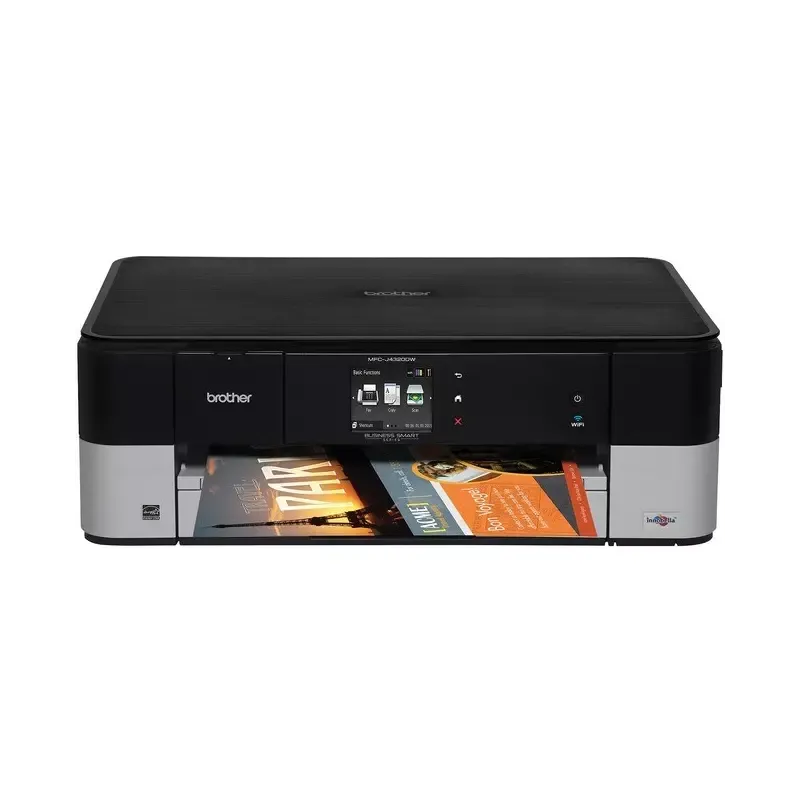

Manual of product MFC-J4320DW

Editorial note
The Brother MFC-J4320DW stands out for its impressive performance, notably a high printing speed of 35 pages per minute in black and 27 pages per minute in color, making it an ideal choice for users seeking efficiency. Its print quality is also remarkable, with a maximum resolution of 6000 x 1200 DPI, ensuring documents and images with vibrant and accurate colors. Additionally, the automatic duplex printing feature helps reduce paper consumption, which is an ecological advantage. In terms of connectivity, the printer offers wireless access via Wi-Fi, making it easy to print from various mobile devices. Its modern and compact design allows it to fit seamlessly into various work environments. However, it has some limitations, including the lack of an Ethernet connection, which may restrict connectivity options for some users. Furthermore, the paper tray capacity of 150 sheets may require frequent refills during high-volume printing. The user experience is generally positive thanks to an intuitive interface and smooth operation. However, the automatic document feeder capacity, limited to 20 sheets, may be a drawback for those who need to scan many documents at once. Overall, the Brother MFC-J4320DW offers good value for money, with practical features and superior print quality, although it may be less suitable for very high-intensity work environments.Score details
User experience
The user experience is generally positive due to wireless connectivity and an intuitive interface, making it easy to print from various mobile devices.
Performance
The printing speed is high, at 35 ppm in black and 27 ppm in color, but may not be sufficient for very high-intensity work environments.
Design
The design is modern and compact, suitable for various work environments, but the dimensions and weight are not specified.
Value for money
The value for money is good due to the print quality and features, although the limited paper capacity may require frequent reloading.
Features
Features include automatic duplex printing and color scanning, but the lack of Ethernet connectivity could limit some users.
Usability
The usage is generally smooth and intuitive, but the automatic document feeder capacity is limited to 20 sheets, which can be a drawback.
Advantages
Fast printing: 35 ppm black, 27 ppm color
Automatic duplex printing for less paper
Print quality 6000 x 1200 DPI
Color scanning 2400 x 2400 DPI
Wi-Fi connectivity for easy mobile printing
Compact design, suitable for all spaces
Disadvantages
No Ethernet/LAN connection.
Paper tray too small (150 sheets).
Insufficient printing speed for large volumes.
Dimensions not specified for integration.
ADF scanner limited to 20 sheets.
Technical Specifications MFC-J4320DW
General Information
-
ModelMFC-J4320DW
-
Brand
-
Category
-
Type
-
SKU1372767
-
MPN1372767
Print speed
-
Printing technologyInkjet
-
PrintingColor printing
-
Print speed (black, normal quality, A4/US Letter)35 ppm
-
Maximum resolution6000 x 1200 DPI
-
Print speed (color, normal quality, A4/US Letter)27 ppm
-
Double-sided printingYes
Copier
-
CopyColor copy
-
Max. resolution of copies- DPI
-
Resizing copy25 - 400 %
-
All-in-one function (N=)2, 4
Digitization
-
DigitizationColor scanning
-
Optical scanning resolution2400 x 2400 DPI
-
Maximum scanning resolution19200 x 19200 DPI
-
Type of scannerADF scanner
-
Scan toE-mail, E-mail Server, FTP, Image, OCR, USB
-
Supported image formatsBMP, JPG, PCX, PNG, TIF
-
Support for text formatsHTM, PDF
-
Input color display depth48 bit
Fax
-
FaxColor fax
-
Fax transmission speed7 sec/page
-
Modem speed33.6 Kbit/s
-
Fax memory200 pages
-
Fax transmission50 localizations
-
Caller IDYes
-
Caller IDYes
-
Caller IDYes
-
Caller IDYes
-
Fax coding methodsJPEG, MH, MMR (Fax coding method), MR
-
Caller IDYes
Features
-
Service cycle (Maximum)13000 pages per month
-
Digital senderNo
-
Number of print cartridges4
-
Printing colorsBlack, Cyan, Magenta, Yellow
-
Service cycle (recommended)250 - 1000 pages per month
Input and output capacity
-
Total power capacity150 sheets
-
Paper feed typePaper bin
-
Automatic document feeder capacity20 sheets
-
Total number of power supply units1
-
Total output capacity50 sheets
-
Automatic Document Feeder (ADF)Yes
Paper management
-
ISO, Format Series A (A0...A9)A4
-
Type of paper tray supportOrdinary paper
-
ISO, Format Series A (A0...A9)A4
-
Non-ISO print support sizesLegal
-
Weight of paper tray support (imperial)17 - 58 kg
-
Support width customization88.9 - 215.9 mm
-
Customization of support length127 - 279.4 mm
Design
-
ScreenLCD
-
Screen size2.7 "
-
Built-in screenYes
-
Product colorBlack, silver
-
Built-in screenYes
-
Market positionDomestic and professional
-
Order typeTouchscreen
Network
-
Ethernet/LANNo
-
WifiYes
-
Security-supported algorithm128-bit WEP, 64-bit WEP, SSID, TKIP, WPA-AES, WPA-PSK, WPA-TKIP, WPA2-AES, WPA2-PSK
-
Wifi standards802.11b, 802.11g, Wi-Fi 4 (802.11n)
-
Support for network protocols (IPv4)ARP, RARP, BOOTP, DHCP, APIPA (Auto IP), WINS/NetBIOS, DNS, mDNS, LLMNR, LPR/LPD, Custom Raw Port/Port9100, IPP, FTP, SNMPv1/v2c, TFTP, SMTP, ICMP, CIFS, SNTP, POP3, IMAP4, HTTP
-
Support for network protocols (IPv6)NDP, RA, mDNS, LLMNR, DNS, LPR/LPD, Custom Raw Port/Port9100, IPP, FTP client/server, SNMPv1/v2, TFTP, SMTP, POP3, CIFS, SNTP, IMAP4, ICMPv6, HTTP
-
Mobile printing technologiesApple AirPrint, Brother iPrint & Scan, Google Cloud Print
-
Online services supportedDropbox, Evernote, Google Drive
Connectivity
-
USB portYes
-
Standard interfacesUSB 2.0, Wireless LAN
-
USB portYes
Other features
-
PictBridgeYes
-
Sound level50 dB
Representation / realization
-
Internal memory128 MB
-
Built-in memory card readerYes
Power
-
Electricity consumption (average operation)22 W
-
Energy consumption (eco mode)1.6 W
-
Energy consumption (standby mode)4.5 W
Minimum system requirements
-
Support for the Mac operating systemYes
-
Support for the Mac operating systemYes
Packaging contents
-
Provided softwareScansoft PaperPort 12 SE
-
Scansoft PaperPort 11 SE
-
Presto! PageManager
Sustainability
-
Sustainability certificatesENERGY STAR
Weight and dimensions
-
Height- mm
-
Height- mm
-
Height- mm
-
Weight- g
Environmental conditions
-
Operating relative humidity (H-H)20 - 80 %
-
Operating temperature10 - 35 °C
Frequently Asked Questions
What is the weight of the Brother MFC-J4320DW printer?
What is the best method to remove jammed paper from the printer?
Why is my printer not recognizing the original cartridges?
What are the reasons for poor print quality?
What is the difference between a laser printer and an inkjet printer?
Why is my inkjet printer producing black streaks?
What does the acronym DPI mean?
How many cartridges are compatible with the Brother MFC-J4320DW?
What is the size of the screen on the Brother MFC-J4320DW?
What is the height of the Brother MFC-J4320DW printer?
What is the width of the Brother MFC-J4320DW?
What is the depth of the Brother MFC-J4320DW?
Is the user manual for the Brother MFC-J4320DW available in French?
Similar products


More product categories from brand Brother
Home appliances Brother
Other Brother
Tools Brother
Phones Brother
Interior Brother
More product types from brand Brother


Presentation of product MFC-J4320DW specifications from brand Brother
General Information
The Brother MFC-J4320DW is a multifunction printer recognized for its performance and innovation. This inkjet printer is designed to provide an enhanced user experience with its superior print quality. Its unique EAN code, 0012502637677, allows for easy identification in the distribution system.
Print Speed
Equipped with advanced printing technology, the Brother MFC-J4320DW guarantees precise results with a print speed of 35 pages per minute in black and 27 pages per minute in color. Its maximum resolution of 6000 x 1200 DPI ensures exceptional clarity, making this printer ideal for documents and images requiring vibrant colors. Additionally, the automatic duplex printing feature optimizes paper usage by reducing waste.
Copier
The copying module of the Brother MFC-J4320DW allows for color reproduction, providing faithful prints. Although the maximum resolution of copies is not specified, resizing copies is possible from 25 to 400%, offering valuable flexibility in various work situations. The all-in-one functionality makes the device easy to use, enhancing office task efficiency.
Scanning
Color scanning is another strong point of the Brother MFC-J4320DW, with an optical resolution of 2400 x 2400 DPI and a maximum scanning resolution reaching 19200 x 19200 DPI. The ADF (Automatic Document Feeder) scanner allows for quick scanning of multiple pages, while various protocols like E-mail, FTP, and USB provide great flexibility. Supported image formats, such as BMP, JPG, and PNG, ensure optimal quality for your visual needs.
Fax
The Brother MFC-J4320DW is also equipped with a color fax machine, capable of sending and receiving documents quickly, with a transmission speed of 7 seconds per page. Its fax memory can store up to 200 pages, facilitating the management of outgoing faxes. The ability to send to 50 locations and the automatic reduction of sent document formats optimize resource usage.
Features
Designed for a maximum duty cycle of 13000 pages per month, the Brother MFC-J4320DW meets the needs of heavy users. With a cartridge system comprising 4 colors (black, cyan, magenta, yellow), it ensures quality printing. The recommended duty cycle is between 250 and 1000 pages per month for optimal performance.
Input and Output Capacity
This printer has a paper capacity of 150 sheets, ideal for regular printing. The paper tray and the automatic document feeder of 20 sheets allow for efficient management of printing and scanning tasks. The output capacity is 50 sheets, ensuring effective handling of printed documents.
Paper Management
Compatible with A4 format, the Brother MFC-J4320DW supports various types of media, including plain paper and legal formats. With customization of media width and length, it allows for adaptation to the specific needs of the user.
Design
Equipped with a 2.7-inch LCD screen, the printer offers an intuitive user interface. Its modern black and silver design makes it suitable for both professional and home work environments. The touchscreen simplifies commands, enhancing the overall user experience.
Network
Although the Brother MFC-J4320DW does not have Ethernet connectivity, it supports Wi-Fi for fast wireless connection. Its advanced security protocols ensure data protection, while support for various network protocols allows for easy integration into the work environment.
Connectivity
This printer allows for direct printing from mobile devices and has a USB port for quick connection. Standard interfaces also facilitate integration with other devices.
Other Features
The Brother MFC-J4320DW includes PictBridge functionality, allowing direct printing of photos from compatible cameras. With a noise level of 50 dB, it ensures a pleasant use without noise disturbances.
Power
Its average power consumption during operation is 22 W, while in energy-saving mode, it drops to 1.6 W. This level of energy efficiency helps reduce operating costs while preserving the environment.
Minimum System Requirements
The Brother MFC-J4320DW ensures optimal compatibility with Windows and Mac operating systems, providing a smooth user experience.
Package Contents
The included software comprises Scansoft PaperPort 12 SE and Presto! PageManager, facilitating document use and management.
Durability
This printer is ENERGY STAR certified, attesting to its compliance with energy efficiency and sustainability standards.
Environmental Conditions
The Brother MFC-J4320DW operates efficiently in a relative humidity of 20 to 80% and in a temperature range of 10 to 35 °C, ensuring optimal performance in various environments.


