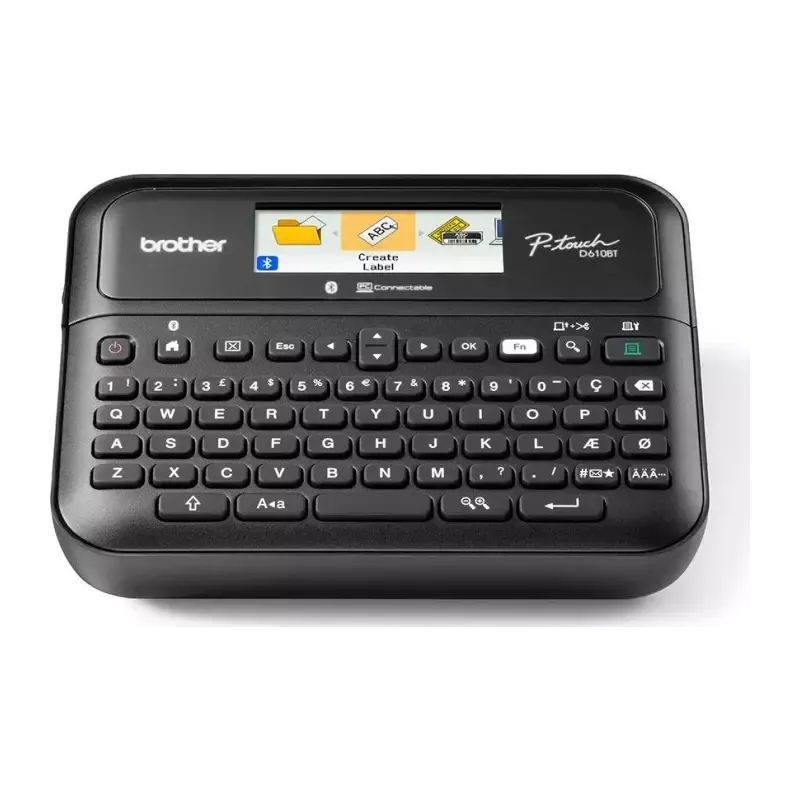

Manual of product PT-D610BT

Editorial note
The Brother PT-D610BT is a label printer that stands out for its speed and print quality. With a print speed of 30 mm/sec and a maximum resolution of 180 x 360 DPI, this model ensures clear and precise results, perfect for various professional and personal needs. Additionally, its color LCD screen and QWERTY keyboard provide an intuitive user experience, making label creation easier. However, the model has some limitations. It only supports monochrome printing, which reduces customization options. While its print speed is satisfactory for most users, it may be insufficient for more demanding work environments. Furthermore, its weight of 1040 g may pose a portability issue, and the maximum print width of 24 mm may not be suitable for all projects. The lack of Ethernet/LAN connectivity may also disappoint those who prefer a stable wired network connection. In terms of features, the Brother PT-D610BT is distinguished by its flexible connectivity, including Bluetooth and USB, as well as its automatic cutter, which facilitates paper management. Despite a value-for-money ratio that could be improved due to the lack of color printing, the printer remains a wise choice thanks to its ergonomic design and connectivity options. Overall, the Brother PT-D610BT is an efficient and easy-to-use printer, ideal for those seeking a quick and reliable solution for their labeling needs, although it is important to keep in mind its few limitations.Score details
User experience
The user experience is pleasant thanks to a color LCD screen and a QWERTY keyboard, making label creation easier.
Performance
The printing speed of 30 mm/sec is satisfactory, but may be insufficient for more intensive printing needs.
Battery life
The product uses AA batteries, providing a reasonable lifespan for extended use.
Design
The design is modern and ergonomic, but the weight of 1040 g may limit the printer's portability.
Features
The connectivity features, including Bluetooth and USB, as well as the automatic cutter, enhance efficiency and usability flexibility.
Value for money
Although the product offers good features, the lack of color printing and the maximum print width of 24 mm may limit its value for some users.
Usability
The intuitive use and connectivity options make this product a good choice for users, despite some limitations in terms of customization.
Advantages
Fast printing at 30 mm/sec
Wireless and USB connectivity
High resolution of 180 x 360 DPI
Color LCD screen and QWERTY keyboard
Automatic cutter for easy cutting
Disadvantages
Monochrome prints only, little customization.
Print speed deemed insufficient for some.
Heavy weight, less portable to carry.
Print width limited to 24 mm.
No Ethernet/LAN connectivity available.
Technical Specifications PT-D610BT
General Information
-
ModelPT-D610BT
-
Brand
-
Category
-
Type
-
SKU1777774
-
MPN1777774
Print speed
-
Printing technologyThermal transfer
-
ColorNo
-
Maximum resolution180 x 360 DPI
-
Print speed (metric measurement)30 mm/sec
-
Maximum print width24 mm
-
Maximum print height18 mm
Design
-
Product colorBlack
-
ScreenLCD
-
Color displayYes
-
Keyboard layoutQWERTY
Weight and dimensions
-
Width203 mm
-
Height86 mm
-
Depth195 mm
-
Weight1040 g
Packaging information
-
Package width254 mm
-
Package depth122 mm
-
Package height320 mm
Representation / realization
-
Type of magnetic tapeTZe
-
Number of fonts17
Connectivity
-
Ethernet/LAN-
-
Wifi-
-
Connectivity technologyWith wire & wireless
-
USB portYes
-
USB portYes
Paper management
-
Automatic cutterYes
Power
-
Battery typeAA
-
Number of supported batteries6
Frequently Asked Questions
What is the weight of the Brother PT-D610BT?
What is the recommended method for removing a jammed paper from the printer?
Why is my printer not recognizing the original cartridges?
What could be the reasons for poor print quality?
What is the difference between a laser printer and an inkjet printer?
Why does my inkjet printer leave black streaks on prints?
What does the acronym DPI mean?
What is the height of the Brother PT-D610BT?
What is the width of the Brother PT-D610BT?
What is the depth of the Brother PT-D610BT?
Is the manual for the Brother PT-D610BT available in French?
Similar products


More product categories from brand Brother
Home appliances Brother
Other Brother
Tools Brother
Phones Brother
Interior Brother
More product types from brand Brother


Presentation of product PT-D610BT specifications from brand Brother
General Information
The Brother PT-D610BT printer is a product of the renowned Brother brand, known for its commitment to quality and innovation in the office equipment sector. This model, designated PT-D610BT, is designed to provide reliable performance and a smooth user experience. Its EAN code, 0012502668794, 4977766824958, allows for precise identification in distribution systems.
Print Speed
Equipped with thermal transfer printing technology, the Brother PT-D610BT ensures superior print quality with highly accurate results. Although the model only supports monochrome printing, it guarantees a maximum resolution of 180 x 360 DPI, providing sharp and detailed prints. Its print speed of 30 mm/sec allows for efficient printing tasks, while the maximum print width of 24 mm and a print height of up to 18 mm ensure labels suitable for various needs.
Design
The design of the Brother PT-D610BT is both modern and functional, coated in an elegant black hue. Its color LCD screen offers appreciated display clarity for intuitive use. The QWERTY keyboard is designed to facilitate input, making label creation simple and quick.
Weight and Dimensions
The dimensions of the printer are suitable for easy integration into different workspaces, with a width of 203 mm, a height of 86 mm, and a depth of 195 mm. Weighing 1040 g, it is light enough to be moved while remaining stable during use.
Packaging Information
For transport, the packaging of the Brother PT-D610BT features optimal dimensions: 254 mm in width, 122 mm in depth, and 320 mm in height, thus ensuring adequate protection of the product during delivery.
Representation / Realization
This printer uses TZe type magnetic tapes, ensuring compatibility and suitable print quality. With a choice of 17 fonts, it allows for adjusting the style of labels according to your specific needs.
Connectivity
The Brother PT-D610BT offers flexible connectivity, both wired and wireless, including Bluetooth functionality for easy connection to other devices. It is also equipped with a USB port for quick connection. However, it is worth noting that it does not have Ethernet/LAN connectivity, which may limit its use in environments requiring a stable network connection.
Paper Management
To simplify the printing process, this printer integrates an automatic cutter, allowing for precise and efficient label cuts, optimizing document management.
Power
The Brother PT-D610BT operates with AA type batteries, supporting up to 6 batteries to ensure prolonged use without interruption.


